Oracle collections
1. Definition
2. Persistent and non-persistent collections
3. Declarations
4. Initalization
5. Handle the collection
6. Methods
7. Multi-level Collections
8. Collections and database
tables
9. Collection and BULK COLLECT
10.
Oracle Forms and collections
Purpose
The goal of this article is to show the principal
features about the collections.
We will see how to declare, initialize and handle
collection with SQL and PL/SQL.
All the examples have been runned on a 10.1.0.2.0
database release.
1. Definition
This
is what the documentation says about collections:
“A collection
is an ordered group of elements, all of the same type. It is a general concept that
encompasses lists, arrays, and other familiar datatypes. Each element has a
unique subscript that determines its position in the collection.
PL/SQL offers these
collection types:
·
Index-by
tables, also known as associative
arrays, let you look up elements using arbitrary numbers and strings
for subscript values. (They are similar to hash tables in other
programming languages.)
·
Nested
tables hold an
arbitrary number of elements. They use sequential numbers as subscripts. You
can define equivalent SQL types, allowing nested tables to be stored in
database tables and manipulated through SQL.
·
Varrays (short for variable-size arrays) hold a fixed number
of elements (although you can change the number of elements at runtime). They
use sequential numbers as subscripts. You can define equivalent SQL types,
allowing varrays to be stored in database tables. They can be stored and
retrieved through SQL, but with less flexibility than nested tables.
Although collections can
have only one dimension, you can model multi-dimensional arrays by creating
collections whose elements are also collections.
To use collections in an
application, you define one or more PL/SQL types, then define variables of
those types. You can define collection types in a procedure, function, or
package. You can pass collection variables as parameters, to move data between
client-side applications and stored subprograms.
To look up data that is more
complex than single values, you can store PL/SQL records or SQL object types in
collections. Nested tables and varrays can also be attributes of object types.”
2. Persistent and
non-persistent collections
Index-by tables cannot be stored in database tables, so they are non-persistent.
You
cannot use them in a SQL statement and are available only in PL/SQL blocks.
Nested
tables and Varrays are persistent. You can use
the CREATE TYPE statement to create them in the database, you can read and
write them from/to a database column.
Nested
tables and Varrays must have been initialized before you can use them.
3. Declarations
3.1 Nested tables
TYPE type_name IS TABLE OF element_type [NOT NULL];
With
nested tables declared within PL/SQL, element_type can
be any PL/SQL datatype except : REF CURSOR
Nested
tables declared in SQL (CREATE TYPE) have additional restrictions. They cannot use the following element types:
q
BINARY_INTEGER, PLS_INTEGER
q
BOOLEAN
q
LONG, LONG RAW
q
NATURAL, NATURALN
q
POSITIVE, POSITIVEN
q
REF CURSOR
q
SIGNTYPE
q
STRING
PL/SQL
Declare
TYPE TYP_NT_NUM IS TABLE OF NUMBER ;
SQL
CREATE [OR
REPLACE] TYPE TYP_NT_NUM IS TABLE OF NUMBER ;
3.2 Varrays
TYPE type_name IS {VARRAY | VARYING ARRAY} (size_limit) OFelement_type[NOT NULL];
size_limit is a positive integer
literal representing the maximum number of elements in the array.
PL/SQL
Declare
TYPE TYP_V_CHAR IS VARRAY(10) OF VARCHAR2(20) ;
SQL
CREATE [OR REPLACE] TYPE TYP_V_CHAR IS VARRAY(10) OF VARCHAR2(20) ;
3.3
Index-by tables
TYPE type_name IS TABLE OF element_type [NOT NULL] INDEX BY [BINARY_INTEGER | PLS_INTEGER | VARCHAR2(size_limit)];
INDEX BY key_type;
The key_type can be numeric, either BINARY_INTEGER or PLS_INTEGER(9i).
It can also be VARCHAR2 or
one of its subtypes VARCHAR, STRING, or LONG. You must specify the length of a VARCHAR2-based key, except for LONG
which is equivalent to declaring a key type of VARCHAR2(32760).
The types RAW, LONG RAW, ROWID, CHAR, and CHARACTER are not allowed as keys for
an associative array.
Declare
TYPE
TYP_TAB_VAR IS TABLE OF VARCHAR2(50) INDEX BY BINARY_INTEGER ;
4. Initalization
Only Nested tables and varrays need
initialization.
To initialize a collection, you use
the “constructor” of the collection which name is the same as the collection.
4.1 Nested
tables
Declare
TYPE
TYP_NT_NUM IS TABLE OF NUMBER ;
Nt_tab
TYP_NT_NUM ;
Begin
Nt_tab :=
TYP_NT_NUM( 5, 10, 15, 20 ) ;
End ;
4.2 Varrays
Declare
TYPE
TYP_V_DAY IS VARRAY(7) OF VARCHAR2(15) ;
v_tab
TYP_V_DAY ;
Begin
v_tab :=
TYP_NT_NUM(
‘Sunday’,’Monday’,’Tuesday’,’Wedneday’,’Thursday’,’Friday’,’Saturday’ ) ;
End ;
It is not required to initialize all the elements of a collection. You
can either initialize no element. In this case, use an empty constructor.
v_tab := TYP_NT_NUM() ; This collection is empty, which is different than a NULL collection (not initialized).
4.3 Index-by tables
Declare
TYPE TYP_TAB
IS TABLE OF NUMBER INDEX BY PLS_INTEGER ;
my_tab TYP_TAB ;
Begin
my_tab(1) :=
5 ;
my_tab(2) :=
10 ;
my_tab(3) :=
15 ;
End ;
5. Handle the collection
While the collection is not initialized (Nested tables and Varrays), it
is not possible to manipulate it.
You can test if a collection is initialized:
Declare
TYPE TYP_VAR_TAB is VARRAY(30) of varchar2(100) ;
tab1 TYP_VAR_TAB ; -- declared but not initializedBegin
If Tab1 IS NULL Then -- NULL collection, have to initialize it -- Tab1 := TYP_VAR_TAB('','','','','','','','','',''); End if ; -- Now, we can handle the collection --End ;
To access an element of a collection, we need to use a subscript value that indicates the unique element of the collection.
The subscript is of type integer or
varchar2.
Declare
Type TYPE_TAB_EMP IS
TABLE OF Varchar2(60) INDEX BY BINARY_INTEGER ;
emp_tab TYPE_TAB_EMP ;
i pls_integer ;
Begin
For i in 0..10 Loop
emp_tab( i+1 ) := 'Emp ' || ltrim( to_char( i ) ) ;
End loop ;
End ;
Declare
Type TYPE_TAB_DAYS IS
TABLE OF PLS_INTEGER INDEX BY VARCHAR2(20) ;
day_tab TYPE_TAB_DAYS ;
Begin
day_tab( 'Monday' ) :=
10 ;
day_tab( 'Tuesday' ) :=
20 ;
day_tab( 'Wednesday' ) := 30 ;
End ;
It is possible to assign values of a collection to another collection if
they are of the same type.
Declare
Type TYPE_TAB_EMP IS TABLE OF EMP%ROWTYPE INDEX BY BINARY_INTEGER ; Type TYPE_TAB_EMP2 IS TABLE OF EMP%ROWTYPE INDEX BY BINARY_INTEGER ; tab1 TYPE_TAB_EMP := TYPE_TAB_EMP( ... ); tab2 TYPE_TAB_EMP := TYPE_TAB_EMP( ... ); tab3 TYPE_TAB_EMP2 := TYPE_TAB_EMP2( ... ); Begin
tab2 := tab1 ; -- OK tab3 := tab1 ; -- Error : types not similar...
End ;
Comparing collections
Until the 10g release, collections cannot be directly compared for
equality or inequality.
The 10g release allows to do some comparaisons between collections:
You can compare collections of same type to verify if they ar equals or
not equals
DECLARE
TYPE Colors IS TABLE OF VARCHAR2(64); primaries Colors := Colors('Blue','Green','Red'); rgb Colors := Colors('Red','Green','Blue'); traffic_light Colors := Colors('Red','Green','Amber');BEGIN
-- We can use = or !=, but not < or >.
-- 2 collections are equal even if the membersare not in the same order.
IF primaries = rgb THEN dbms_output.put_line('OK, PRIMARIES & RGB have same members.'); END IF; IF rgb != traffic_light THENdbms_output.put_line('RGB & TRAFFIC_LIGHT have different members');
END IF;END;
You can also apply some operators on the collections:
DECLARE
TYPE nested_typ IS TABLE OF NUMBER;
nt1 nested_typ := nested_typ(1,2,3);
nt2 nested_typ := nested_typ(3,2,1);
nt3 nested_typ := nested_typ(2,3,1,3);
nt4 nested_typ := nested_typ(1,2,4);
reponse BOOLEAN;
combien NUMBER;
PROCEDURE verif(test BOOLEAN DEFAULT NULL, label IN VARCHAR2
DEFAULT NULL, quantity NUMBER DEFAULT NULL) IS
BEGIN
IF test IS NOT NULL THEN
dbms_output.put_line(label || ' -> ' || CASE test WHEN
TRUE THEN 'True' WHEN FALSE THEN 'False' END);
END IF;
IF quantity IS NOT NULL THEN
dbms_output.put_line(quantity);
END IF;
END;
BEGIN
reponse := nt1 IN (nt2,nt3,nt4); --
true, nt1 correspond to nt2
verif(test => reponse, label => 'nt1 IN (nt2,nt3,nt4)');
reponse := nt1 SUBMULTISET OF nt3; --
true, all elements correpond
verif(test => reponse, label => 'nt1 SUBMULTISET OF nt3');
reponse := nt1 NOT SUBMULTISET OF nt4; -- true
verif(test => reponse, label => 'nt1 NOT SUBMULTISET OF
nt4');
combien := CARDINALITY(nt3); --
number of elements of nt3
verif(quantity => combien);
combien := CARDINALITY(SET(nt3)); -- number of distinct elements
verif(quantity => combien);
reponse := 4 MEMBER OF nt1; -- false, no corresponding element
verif(test => reponse, label => '4 MEMBER OF nt1');
reponse := nt3 IS A SET; -- false,
nt3 have duplicated elements
verif(test => reponse, label => 'nt3 IS A SET' );
reponse := nt3 IS NOT A SET; --
true, nt3 have diplicated elements
verif(test => reponse, label => 'nt3 IS NOT A SET' );
reponse := nt1 IS EMPTY; -- false,
nt1 have elements
verif(test => reponse, label => 'nt1 IS EMPTY' );
END;
nt1 IN (nt2,nt3,nt4) -> True
nt1 SUBMULTISET OF nt3 -> True
nt1 NOT SUBMULTISET OF nt4 -> True
4
3
4 MEMBER OF nt1 -> False
nt3 IS A SET -> False
nt3 IS NOT A SET -> True
nt1 IS EMPTY -> False
6. Methods
We can use the following methods on a collection:
·
EXISTS
·
COUNT
·
LIMIT
·
FIRST and LAST
·
PRIOR and NEXT
·
EXTEND
·
TRIM
·
DELETE
A collection method
is a built-in function or procedure that operates on collections and is called
using dot notation.
collection_name.method_name[(parameters)]
Collection methods cannot be called
from SQL statements.
Only the EXISTS method can be used on
a NULL collection.
all other methods applied on a null collection raise the
COLLECTION_IS_NULL error.
6.1 EXISTS(index)
Returns TRUE if the index element exists in the collection, else it
returns FALSE.
Use this method to be sure you are doing a valid operation on the collection.
This method does not raise the SUBSCRIPT_OUTSIDE_LIMIT exception if used on an
element that does not exists in the collection.
If my_collection.EXISTS(10)
Then
My_collection.DELETE(10) ;
End if ;
6.2
COUNT
Returns the number of elements in a collection.
SQL> Declare
2 TYPE
TYP_TAB IS TABLE OF NUMBER;
3 my_tab
TYP_TAB := TYP_TAB( 1, 2, 3, 4, 5 );
4 Begin
5 Dbms_output.Put_line( 'COUNT = ' ||
To_Char( my_tab.COUNT ) ) ;
6 my_tab.DELETE(2) ;
7 Dbms_output.Put_line( 'COUNT = ' ||
To_Char( my_tab.COUNT ) ) ;
8 End ;
9 /
COUNT = 5
COUNT = 4
PL/SQL procedure successfully completed.
6.3
LIMIT
Returns the maximum number of elements that a varray can contain.
Return NULL for Nested tables and Index-by tables
SQL> Declare
2 TYPE TYP_ARRAY IS ARRAY(30) OF NUMBER ;
3 my_array TYP_ARRAY :=
TYP_ARRAY( 1, 2, 3 ) ;
4 Begin
5 dbms_output.put_line( 'Max array size is '
|| my_array.LIMIT ) ;
6 End;
7 /
Max array size is 30
6.4
FIRST and LAST
Returns the first or last subscript of a collection.
If the collection is empty, FIRST and LAST return NULL
SQL> Declare
2 TYPE
TYP_TAB IS TABLE OF NUMBER;
3 my_tab
TYP_TAB := TYP_TAB( 1, 2, 3, 4, 5 );
4 Begin
5 For i IN my_tab.FIRST .. my_tab.LAST
Loop
6
Dbms_output.Put_line( 'my_tab(' || Ltrim(To_Char(i)) || ') = ' ||
To_Char( my_tab(i) ) ) ;
7 End loop ;
8 End ;
9
10 /
my_tab(1) = 1
my_tab(2) = 2
my_tab(3) = 3
my_tab(4) = 4
my_tab(5) = 5
PL/SQL procedure successfully completed.
SQL> Declare
2 TYPE
TYP_TAB IS TABLE OF PLS_INTEGER INDEX BY VARCHAR2(1);
3 my_tab
TYP_TAB;
4 Begin
5 For i in 65 .. 69 Loop
6 my_tab( Chr(i) ) := i ;
7 End loop ;
8 Dbms_Output.Put_Line( 'First= ' ||
my_tab.FIRST || ' Last= ' ||
my_tab.LAST ) ;
9 End ;
10 /
First= A Last= E
PL/SQL procedure successfully completed.
6.5
PRIOR(index) and NEXT(index)
Returns the previous or next subscript of the index element.
If the index element has no predecessor, PRIOR(index) returns NULL. Likewise, if index has no successor, NEXT(index) returns NULL.
SQL> Declare
2 TYPE
TYP_TAB IS TABLE OF PLS_INTEGER INDEX BY VARCHAR2(1) ;
3 my_tab
TYP_TAB ;
4 c
Varchar2(1) ;
5 Begin
6 For i in 65 .. 69 Loop
7 my_tab( Chr(i) ) := i ;
8 End loop ;
9 c := my_tab.FIRST ; -- first element
10 Loop
11 Dbms_Output.Put_Line( 'my_tab(' || c || ') = ' || my_tab(c) ) ;
12 c := my_tab.NEXT(c) ; -- get the successor element
13 Exit When c IS NULL ; -- end of collection
14 End loop ;
15 End ;
16 /
my_tab(A) = 65
my_tab(B) = 66
my_tab(C) = 67
my_tab(D) = 68
my_tab(E) = 69
PL/SQL procedure successfully completed.
Use the PRIOR() or NEXT() method to be sure that you do not access an
invalid element:
SQL> Declare
2 TYPE
TYP_TAB IS TABLE OF PLS_INTEGER ;
3 my_tab
TYP_TAB := TYP_TAB( 1, 2, 3, 4, 5 );
4 Begin
5 my_tab.DELETE(2) ; -- delete an element of the collection
6 For i in my_tab.FIRST .. my_tab.LAST Loop
7 Dbms_Output.Put_Line( 'my_tab(' ||
Ltrim(To_char(i)) || ') = ' || my_tab(i) ) ;
8 End loop ;
9 End ;
10 /
my_tab(1) = 1
Declare
*
ERROR at line 1:
ORA-01403: no data found
ORA-06512: at line 7
In this example, we get an error because one element of the collection
was deleted.
One solution is to use the PRIOR()/NEXT() method:
SQL> Declare
2 TYPE
TYP_TAB IS TABLE OF PLS_INTEGER ;
3 my_tab
TYP_TAB := TYP_TAB( 1, 2, 3, 4, 5 );
4 v Pls_Integer ;
5 Begin
6
my_tab.DELETE(2) ;
7 v := my_tab.first ;
8 Loop
9 Dbms_Output.Put_Line( 'my_tab(' ||
Ltrim(To_char(v)) || ') = ' || my_tab(v) ) ;
10 v := my_tab.NEXT(v) ; -- get the
next valid subscript
11 Exit When v IS NULL ;
12 End loop ;
13 End ;
14 /
my_tab(1) = 1
my_tab(3) = 3
my_tab(4) = 4
my_tab(5) = 5
PL/SQL procedure successfully completed.
Another solution is to test if the index exists
before use it:
SQL> Declare
2 TYPE
TYP_TAB IS TABLE OF PLS_INTEGER ;
3 my_tab
TYP_TAB := TYP_TAB( 1, 2, 3, 4, 5 );
4 Begin
5 my_tab.DELETE(2) ;
6 For i IN my_tab.FIRST .. my_tab.LAST Loop
7 If my_tab.EXISTS(i) Then
8 Dbms_Output.Put_Line( 'my_tab(' ||
Ltrim(To_char(i)) || ') = ' || my_tab(i) ) ;
9 End if ;
10 End loop ;
11 End ;
12 /
my_tab(1) = 1
my_tab(3) = 3
my_tab(4) = 4
my_tab(5) = 5
PL/SQL procedure successfully completed.
6.6
EXTEND[(n[,i])]
Used to extend a collection (add new elements)
·
EXTEND appends one null element to a collection.
·
EXTEND(n) appends n null elements to a collection.
·
EXTEND(n,i) appends n copies of the ith element to a collection.
SQL> Declare
2 TYPE TYP_NES_TAB is table of Varchar2(20) ;
3 tab1 TYP_NES_TAB ;
4 i
Pls_Integer ;
5 Procedure Print( i in Pls_Integer ) IS
6 BEGIN Dbms_Output.Put_Line( 'tab1(' ||
ltrim(to_char(i)) ||') = ' || tab1(i) ) ; END ;
7 Procedure PrintAll IS
8 Begin
9 Dbms_Output.Put_Line( '* Print all
collection *' ) ;
10 For i IN tab1.FIRST..tab1.LAST Loop
11 If tab1.EXISTS(i) Then
12 Dbms_Output.Put_Line( 'tab1(' ||
ltrim(to_char(i)) ||') = ' || tab1(i) ) ;
13 End if ;
14 End loop ;
15 End ;
16 Begin
17 tab1 := TYP_NES_TAB('One') ;
18 i := tab1.COUNT ;
19 Dbms_Output.Put_Line( 'tab1.COUNT = ' ||
i ) ;
20 Print(i) ;
21 -- the
following line raise an error because the second index does not exists in the
collection --
22 -- tab1(2) :=
'Two' ;
23 -- Add one
empty element --
24 tab1.EXTEND ;
25 i := tab1.COUNT ;
26 tab1(i) := 'Two' ; Printall ;
27 -- Add two
empty elements --
28 tab1.EXTEND(2) ;
29 i := i + 1 ;
30 tab1(i) := 'Three' ;
31 i := i + 1 ;
32 tab1(i) := 'Four' ; Printall ;
33 -- Add three
elements with the same value as element 4 --
34 tab1.EXTEND(3,1) ;
35 i := i + 3 ; Printall ;
36 End;
/
tab1.COUNT = 1
tab1(1) = One
* Print all collection *
tab1(1) = One
tab1(2) = Two
* Print all collection *
tab1(1) = One
tab1(2) = Two
tab1(3) = Three
tab1(4) = Four
* Print all collection *
tab1(1) = One
tab1(2) = Two
tab1(3) = Three
tab1(4) = Four
tab1(5) = One
tab1(6) = One
tab1(7) = One
PL/SQL procedure successfully completed.
6.7 TRIM[(n)]
Used to decrease the size of a collection
·
TRIM removes one element from the end of a collection.
·
TRIM(n) removes n elements from the end of a collection.
SQL> Declare
2 TYPE TYP_TAB is table of varchar2(100) ;
3 tab
TYP_TAB ;
4 Begin
5 tab := TYP_TAB( 'One','Two','Three' ) ;
6 For i in tab.first..tab.last Loop
7 dbms_output.put_line( 'tab(' || ltrim(
to_char( i ) ) || ') = ' || tab(i) ) ;
8 End loop ;
9 -- add 3 element with second element value --
10 dbms_output.put_line( '* add 3 elements
*' ) ;
11 tab.EXTEND(3,2) ;
12 For i in tab.first..tab.last Loop
13 dbms_output.put_line( 'tab(' || ltrim(
to_char( i ) ) || ') = ' || tab(i) ) ;
14 End loop ;
15 -- suppress the
last element --
16 dbms_output.put_line( '* suppress the last
element *' ) ;
17 tab.TRIM ;
18 For i in tab.first..tab.last Loop
19 dbms_output.put_line( 'tab(' || ltrim(
to_char( i ) ) || ') = ' || tab(i) ) ;
20 End loop ;
21 End;
22 /
tab(1) = One
tab(2) = Two
tab(3) = Three
* add 3 elements *
tab(1) = One
tab(2) = Two
tab(3) = Three
tab(4) = Two
tab(5) = Two
tab(6) = Two
* suppress the last element *
tab(1) = One
tab(2) = Two
tab(3) = Three
tab(4) = Two
tab(5) = Two
PL/SQL procedure successfully completed.
If you try to suppress more elements than the
collection contents, you get a SUBSCRIPT_BEYOND_COUNT exception.
6.8
DELETE[(n[,m])]
·
DELETE removes all elements from a collection.
·
DELETE(n) removes the nth element from an associative array with a numeric key or a nested
table. If the associative array has a string key, the element corresponding to
the key value is deleted. If n is null, DELETE(n) does nothing.
·
DELETE(n,m) removes all elements in the range m..n from an associative array or nested table. If m is larger than n or if m or n is null, DELETE(n,m) does nothing
Caution :
LAST returns the greatest subscript of a collection and COUNT
returns the number of elements of a collection.
If you delete some elements, LAST !=
COUNT.
Suppression of all the elements
SQL> Declare
2 TYPE TYP_TAB is table of varchar2(100) ;
3 tab
TYP_TAB ;
4 Begin
5 tab := TYP_TAB( 'One','Two','Three' ) ;
6 dbms_output.put_line( 'Suppression of all
elements' ) ;
7 tab.DELETE ;
8 dbms_output.put_line( 'tab.COUNT = ' ||
tab.COUNT) ;
9 End;
10 /
Suppression of all elements
tab.COUNT = 0
PL/SQL procedure successfully completed.
Suppression of the second element
SQL> Declare
2 TYPE TYP_TAB is table of varchar2(100) ;
3 tab
TYP_TAB ;
4 Begin
5 tab := TYP_TAB( 'One','Two','Three' ) ;
6 dbms_output.put_line( 'Suppression of the
2nd element' ) ;
7 tab.DELETE(2) ;
8 dbms_output.put_line( 'tab.COUNT = ' ||
tab.COUNT) ;
9 dbms_output.put_line( 'tab.LAST = ' || tab.LAST) ;
10 For i IN tab.FIRST .. tab.LAST Loop
11 If tab.EXISTS(i) Then
12 dbms_output.put_line( tab(i) ) ;
13 End if ;
14 End loop ;
15 End;
16 /
Suppression of the 2nd element
tab.COUNT = 2
tab.LAST = 3
One
Three
PL/SQL procedure successfully completed.
Caution:
For Varrays, you can suppress only the last element.
If the element does not exists, no exception is
raised.
6.9 Main
collection exceptions
DECLARE
TYPE NumList
IS TABLE OF NUMBER;
nums NumList; -- atomically null
BEGIN
/* Assume
execution continues despite the raised exceptions. */
nums(1) :=
1; -- raises
COLLECTION_IS_NULL (1)
nums :=
NumList(1,2); -- initialize table
nums(NULL)
:= 3 -- raises VALUE_ERROR (2)
nums(0) := 3; -- raises SUBSCRIPT_OUTSIDE_LIMIT (3)
nums(3) :=
3; -- raises
SUBSCRIPT_BEYOND_COUNT (4)
nums.DELETE(1); --
delete element 1
IF nums(1) =
1 THEN ... -- raises NO_DATA_FOUND (5)
7. Multi-level Collections
A collection is a one-dimension table.
You can have multi-dimension tables by creating collection of
collection.
SQL> Declare
2 TYPE TYP_TAB is table of NUMBER index by
PLS_INTEGER ;
3 TYPE TYP_TAB_TAB is table of TYP_TAB
index by PLS_INTEGER ;
4 tab1 TYP_TAB_TAB ;
5 Begin
6 For i IN 1 .. 3 Loop
7 For j IN 1 .. 2 Loop
8
tab1(i)(j) := i + j ;
9 dbms_output.put_line( 'tab1(' || ltrim(to_char(i))
10 || ')(' || ltrim(to_char(j))
11 || ') = ' ||
tab1(i)(j) ) ;
12 End loop ;
13 End loop ;
14 End;
15 /
tab1(1)(1) = 2
tab1(1)(2) = 3
tab1(2)(1) = 3
tab1(2)(2) = 4
tab1(3)(1) = 4
tab1(3)(2) = 5
PL/SQL procedure successfully completed.
Collections of records
SQL> Declare
2 TYPE TYP_TAB is table of DEPT%ROWTYPE
index by PLS_INTEGER ;
3 tb_dept TYP_TAB ;
4 rec
DEPT%ROWTYPE ;
5 Cursor
CDEPT IS Select * From DEPT ;
6 Begin
7 Open CDEPT ;
8 Loop
9 Fetch
CDEPT Into rec ;
10 Exit
When CDEPT%NOTFOUND ;
11 tb_dept(CDEPT%ROWCOUNT) := rec ;
12 End loop ;
13 For i IN tb_dept.FIRST .. tb_dept.LAST
Loop
14 dbms_output.put_line( tb_dept(i).DNAME
|| ' - ' ||tb_dept(i).LOC ) ;
15 End loop ;
16 End;
17 /
ACCOUNTING - NEW YORK
RESEARCH - DALLAS
SALES - CHICAGO
OPERATIONS - BOSTON
PL/SQL procedure successfully completed.
8. Collections and database
tables
Nested tables and Varrays can be stored in a database column of
relational or object table.
To manipulate collection from SQL, you have to create the types in the
database with the CREATE TYPE statement.
Nested tables
CREATE [OR REPLACE] TYPE [schema. .] type_name
{ IS | AS } TABLE OF datatype;
Varrays
CREATE [OR REPLACE] TYPE [schema. .] type_name
{ IS | AS } { VARRAY | VARYING ARRAY } ( limit ) OF datatype;
One or several collections can be stored in a database column.
Let’s see an example with a relational table.
You want to make a table that store the invoices and the currents
invoice lines of the company.
You need to define the invoice line type as following:
-- type of invoice line --
CREATE TYPE TYP_LIG_ENV AS
OBJECT (
lig_num Integer,
lig_code
Varchar2(20),
lig_Pht
Number(6,2),
lig_Tva Number(3,1),
ligQty Integer
);
-- nested table of invoice lines --
CREATE TYPE TYP_TAB_LIG_ENV AS TABLE OF TYP_LIG_ENV ;
Then create the invoice table as following:
-- table of invoices --
CREATE TABLE INVOICE (
inv_num Number(9),
inv_numcli Number(6),
inv_date Date,
inv_line
TYP_TAB_LIG_ENV ) –- lines collection
NESTED TABLE
inv_line STORE AS inv_line_table ;
You can query the USER_TYPES view to get information on the types
created in the database.
-- show all types --
SQL> select type_name, typecode, attributes from
user_types
2 /
TYPE_NAME TYPECODE ATTRIBUTES
------------------------------
------------------------------ ----------
TYP_LIG_ENV OBJECT
5
TYP_TAB_LIG_ENV COLLECTION 0
SQL>
You can query the USER_COLL_TYPES view to get information on the
collections created in the database.
-- show collections --
SQL> select type_name, coll_type,
elem_type_owner, elem_type_name from user_coll_types
2 /
TYPE_NAME COLL_TYPE ELEM_TYPE_OWNER ELEM_TYPE_NAME
------------------------- ----------------------
------------------------- -------
TYP_TAB_LIG_ENV TABLE
TEST
TYP_LIG_ENV
You can query the USER_TYPE_ATTRS view to get information on the
collection attributes.
-- show collection attributes --
SQL> select type_name, attr_name,
attr_type_name, length, precision, scale, attr_no
2 from user_type_attrs
3 /
TYPE_NAME
ATTR_NAME ATTR_TYPE_ LENGTH
PRECISION SCALE ATTR_NO
--------------- --------------- ---------- ---------- ----------
---------- ----------
TYP_LIG_ENV
LIG_NUM INTEGER
1
TYP_LIG_ENV
LIG_CODE VARCHAR2 20 2
TYP_LIG_ENV
LIG_PHT NUMBER 6 2 3
TYP_LIG_ENV
LIG_TVA NUMBER 3 1 4
TYP_LIG_ENV
LIGQTY INTEGER
5
Constraints on the collection attributes
You can enforce constraints on each attribute of a collection
-- constraints on collection attributes
--
alter table inv_line_table
add constraint
lignum_notnull CHECK( lig_num IS NOT NULL ) ;
alter table inv_line_table
add constraint ligcode_unique UNIQUE( lig_code ) ;
alter table inv_line_table
add constraint ligtva_check CHECK( lig_tva IN(
5.0,19.6 ) ) ;
Constraints on the whole collection
-- constraints on the whole collection --
alter table invoice
add constraint invoice_notnull CHECK( inv_line IS
NOT NULL )
Check the
constraints
SQL> select constraint_name, constraint_type,
table_name
2 from
user_constraints
3 where table_name IN ('INVOICE','INV_LINE_TABLE')
4 order
by table_name
5 /
CONSTRAINT_NAME C TABLE_NAME
------------------------------ -
------------------------------
LIGNUM_NOTNULL C INV_LINE_TABLE
LIGCODE_UNIQUE U INV_LINE_TABLE
LIGTVA_CHECK C INV_LINE_TABLE
SYS_C0011658 U INVOICE
INVOICE_NOTNULL C INVOICE
SQL> select constraint_name, column_name,
table_name
2 from
user_cons_columns
3 where table_name IN ('INVOICE','INV_LINE_TABLE')
4 order
by table_name
5 /
CONSTRAINT_NAME COLUMN_NAME TABLE_NAME
------------------------------ --------------------
------------------
LIGNUM_NOTNULL LIG_NUM INV_LINE_TABLE
LIGCODE_UNIQUE LIG_CODE INV_LINE_TABLE
LIGTVA_CHECK
LIG_TVA INV_LINE_TABLE
SYS_C0011658 SYS_NC0000400005$ INVOICE
INVOICE_NOTNULL SYS_NC0000400005$ INVOICE
INVOICE_NOTNULL INV_LINE INVOICE
6 rows selected.
8.1 Insertion
Add a line in the INVOICE table
Use the INSERT statement with all the constructors needed for the
collection
SQL> INSERT INTO INVOICE
2 VALUES
3 (
4 1
5 ,1000
6 ,SYSDATE
7 , TYP_TAB_LIG_ENV -- Table of
objects constructor
8 (
9 TYP_LIG_ENV( 1 ,'COD_01', 1000, 5.0,
1 ) -– object constructor
10 )
11 )
12 /
1 row created.
Add a line to the collection
Use the INSERT INTO TABLE statement
INSERT INTO TABLE
( SELECT the_collection
FROM the_table WHERE ... )
The sub query must return a single collection row.
SQL> INSERT INTO TABLE (SELECT inv_line FROM
INVOICE WHERE inv_num = 1)
2 VALUES( TYP_LIG_ENV( 2 ,'COD_02', 50, 5.0,
10 ) )
3 /
1 row created.
Multiple inserts
You can add more than one element in a collection by using the SELECT
statement instead of the VALUES keyword.
INSERT INTO TABLE (SELECT inv_line FROM INVOICE WHERE
inv_num = 1)
SELECT nt.* FROM TABLE (SELECT inv_line FROM INVOICE
WHERE inv_num = 1) nt
/
8.2 Update
8.2.1 Nested table
Use the UPDATE TABLE statement
UPDATE TABLE
( SELECT the_collection
FROM the_table WHERE ... ) alias
SET
Alias.col_name = ...
WHERE ...
The sub query must return a single collection row.
Update a single row of the collection
SQL> UPDATE TABLE (SELECT inv_line FROM INVOICE
WHERE inv_num = 1) nt
2 SET
nt.ligqty = 10
3 WHERE
nt.lig_num = 1
4 /
1 row updated.
Update all the rows of the collection
SQL> UPDATE TABLE (SELECT inv_line FROM INVOICE
WHERE inv_num = 1) nt
2 SET
nt.lig_pht = nt.lig_pht * .1
3 /
2 rows updated.
8.2.2 Varray
It is not possible to update one element of a VARRAY
collection with SQL.
You cannot use the TABLE keyword for this purpose
(because Varrays are not stored in particular table like Nested tables).
So, a single VARRAY element of a collection must be
updated within a PL/SQL block:
-- varray of invoice lines --
CREATE TYPE TYP_VAR_LIG_ENV AS VARRAY(5) OF
TYP_LIG_ENV ;
-- table of invoices with varray --
CREATE TABLE
INVOICE_V (
inv_num
Number(9),
inv_numcli
Number(6),
inv_date
Date,
inv_line TYP_VAR_LIG_ENV ) ;
-- insert
a row --
Insert into INVOICE_V
Values
(
1, 1000, SYSDATE,
TYP_VAR_LIG_ENV
(
TYP_LIG_ENV( 1, 'COD_01', 1000, 5, 1 ),
TYP_LIG_ENV( 2, 'COD_02', 500, 5, 10 ),
TYP_LIG_ENV( 3, 'COD_03', 10, 5, 100 )
)
) ;
SQL> -- Query the varray
collection --
SQL> Declare
2 v_table
TYP_VAR_LIG_ENV ;
3 LC$Head
Varchar2(200) ;
4 LC$Lig Varchar2(200) ;
5 Begin
6 LC$Head
:= 'Num Code Pht Tva Qty' ;
7 Select inv_line Into v_table From
INVOICE_V Where inv_num = 1 For Update of inv_line ;
8 dbms_output.put_line ( LC$Head ) ;
9 For i IN v_table.FIRST .. v_table.LAST
Loop
10 LC$Lig := Rpad(To_char(
v_table(i).lig_num ),3) || ' '
11 || Rpad(v_table(i).lig_code, 10) ||
' '
12 || Rpad(v_table(i).lig_pht,10) || '
'
13 || Rpad(v_table(i).lig_tva,10) || '
'
14 || v_table(i).ligqty ;
15 dbms_output.put_line( LC$Lig ) ;
16 End loop ;
17 End ;
18 /
Num Code
Pht Tva Qty
1 COD_01 1000 5 1
2 COD_02 500 5 10
3 COD_03 10 5 100
PL/SQL procedure successfully completed..
Update the second line of the varray
to change the quantity
SQL> Declare
2 v_table
TYP_VAR_LIG_ENV ;
3 Begin
4 Select inv_line
5 Into
v_table
6 From
INVOICE_V
7 Where
inv_num = 1
8 For Update of inv_line ;
9 v_table(2).ligqty := 2 ; -- update the second element
10 Update INVOICE_V Set inv_line =
v_table Where inv_num = 1 ;
11 End ;
12 /
PL/SQL procedure successfully completed.
Display the new varray:
SQL> -- Query the varray
collection --
SQL> Declare
2 v_table
TYP_VAR_LIG_ENV ;
3 LC$Head
Varchar2(200) ;
4 LC$Lig Varchar2(200) ;
5 Begin
6 LC$Head
:= 'Num Code Pht Tva Qty' ;
7 Select inv_line Into v_table From
INVOICE_V Where inv_num = 1 For Update of inv_line ;
8 dbms_output.put_line ( LC$Head ) ;
9 For i IN v_table.FIRST .. v_table.LAST
Loop
10 LC$Lig := Rpad(To_char(
v_table(i).lig_num ),3) || ' '
11 || Rpad(v_table(i).lig_code, 10) ||
' '
12 || Rpad(v_table(i).lig_pht,10) || '
'
13 || Rpad(v_table(i).lig_tva,10) || '
'
14 || v_table(i).ligqty ;
15 dbms_output.put_line( LC$Lig ) ;
16 End loop ;
17 End ;
18 /
Num Code
Pht Tva Qty
1 COD_01 1000 5 1
2 COD_02 500 5 2
3 COD_03 10 5 100
PL/SQL procedure successfully completed.
8.3 Delete
8.3.1 Nested table
Use the DELETE FROM TABLE statement
Delete a single collection row
DELETE FROM TABLE
( SELECT the_collection
FROM the_table WHERE ... ) alias
WHERE alias.col_name = ...
SQL> DELETE FROM TABLE (SELECT inv_line FROM
INVOICE WHERE inv_num = 1) nt
2 WHERE nt.lig_num = 2
3 /
1 row deleted.
Delete all the collection rows
SQL> DELETE FROM TABLE (SELECT inv_line FROM
INVOICE WHERE inv_num = 1) nt
2 /
1 row deleted.
Use of a PL/SQL record to handle the whole structure
SQL> Declare
2 TYPE TYP_REC IS RECORD
3 (
4 inv_num INVOICE.inv_num%Type,
5 inv_numcli INVOICE.inv_numcli%Type,
6 inv_date INVOICE.inv_date%Type,
7 inv_line INVOICE.inv_line%Type –- collection line
8 );
9
rec_inv TYP_REC ;
10 Cursor C_INV IS Select *
From INVOICE ;
11 Begin
12 Open C_INV ;
13 Loop
14 Fetch C_INV into rec_inv ;
15 Exit when C_INV%NOTFOUND ;
16 For i IN 1 .. rec_inv.inv_line.LAST Loop –- loop through
the collection lines
17 dbms_output.put_line( 'Numcli/Date '
|| rec_inv.inv_numcli || '/' || rec_inv.inv_date
18 || ' Line ' ||
rec_inv.inv_line(i).lig_num
19 || ' code ' ||
rec_inv.inv_line(i).lig_code || ' Qty '
20 ||
To_char(rec_inv.inv_line(i).ligqty) ) ;
21 End loop ;
22 End loop ;
23 End ;
24 /
Numcli/Date 1000/11/11/05 Line 1 code COD_01 Qty 1
Numcli/Date 1000/11/11/05 Line 2 code COD_02 Qty 10
PL/SQL procedure successfully completed.
8.3.2 Varray
Varrays are more complicated to handle.
It is not possible to delete a single element in a Varray collection.
To do the job, you need a PL/SQL block and a temporary Varray that keep
only the lines that are not deleted.
SQL> Declare
2 v_table
TYP_VAR_LIG_ENV ;
3 v_tmp v_table%Type := TYP_VAR_LIG_ENV() ;
4 ind
pls_integer := 1 ;
5 Begin
6 -- select the
collection --
7 Select inv_line
8 Into
v_table
9 From
INVOICE_V
10 Where
inv_num = 1
11 For Update of inv_line ;
12 -- Extend the
temporary varray --
13 v_tmp.EXTEND(v_table.LIMIT) ;
14 For i IN v_table.FIRST .. v_table.LAST
Loop
15 If v_table(i).lig_num <> 2 Then
16 v_tmp(ind) := v_table(i) ; ind
:= ind + 1 ;
17 End if ;
18 End loop ;
19
20 Update INVOICE_V Set inv_line = v_tmp
Where inv_num = 1 ;
21 End ;
22 /
PL/SQL procedure successfully completed.
Display the new collection:
SQL> Declare
2 v_table
TYP_VAR_LIG_ENV ;
3 LC$Head
Varchar2(200) ;
4 LC$Lig Varchar2(200) ;
5 Begin
6 LC$Head
:= 'Num Code Pht Tva Qty' ;
7 Select inv_line Into v_table From
INVOICE_V Where inv_num = 1 For Update of inv_line ;
8 dbms_output.put_line ( LC$Head ) ;
9 For i IN v_table.FIRST .. v_table.LAST
Loop
10 LC$Lig := Rpad(To_char(
v_table(i).lig_num ),3) || ' '
11 || Rpad(v_table(i).lig_code, 10) || ' '
12 || Rpad(v_table(i).lig_pht,10) || '
'
13 || Rpad(v_table(i).lig_tva,10) || '
'
14 || v_table(i).ligqty ;
15 dbms_output.put_line( LC$Lig ) ;
16 End loop ;
17 End ;
18 /
Num Code
Pht Tva Qty
1 COD_01 1000 5 1
3 COD_03 10 5 100
PL/SQL procedure successfully completed.
The second line of the Varray has been deleted.
Here is a Procedure that do the job with any Varray collection
CREATE OR REPLACE
PROCEDURE DEL_ELEM_VARRAY
(
PC$Table in Varchar2, -- Main table name
PC$Pk
in Varchar2, -- PK to identify the main
table row
PC$Type
in Varchar2, -- Varray TYPE
PC$Coll
in Varchar2, -- Varray column name
PC$Index in Varchar2, -- value of PK
PC$Col
in Varchar2, -- Varray column
PC$Value in Varchar2 -- Varray
column value to delete
)
IS
LC$Req Varchar2(2000);
Begin
LC$Req := 'Declare'
|| ' v_table ' || PC$Type || ';'
|| ' v_tmp v_table%Type := ' || PC$Type || '()
;'
|| ' ind
pls_integer := 1 ;'
|| 'Begin'
|| ' Select ' || PC$Coll
|| ' Into
v_table'
|| ' From
' || PC$Table
|| ' Where ' || PC$Pk || '=''' || PC$Index ||
''''
|| ' For Update of ' || PC$Coll || ';'
|| ' v_tmp.EXTEND(v_table.LIMIT) ;'
|| ' For i IN v_table.FIRST .. v_table.LAST
Loop'
|| ' If v_table(i).' || PC$Col|| '<>'''
|| PC$Value || ''' Then'
|| '
v_tmp(ind) := v_table(i) ; ind := ind + 1 ;'
|| ' End if ;'
|| ' End loop ;'
|| ' Update ' || PC$Table || ' Set ' || PC$Coll
|| ' = v_tmp Where ' || PC$Pk || '=''' || PC$Index || ''';'
|| ' End;' ;
Execute immediate LC$Req ;
End ;
/
Let’s delete the third element of the Varray:
SQL> Begin
2 DEL_ELEM_VARRAY
3 (
4 'INVOICE_V',
5 'inv_num',
6 'TYP_VAR_LIG_ENV',
7
'inv_line',
8 '1',
9 'lig_num',
10 '3'
11 );
12 End ;
13 /
PL/SQL procedure successfully completed.
8.4 Query
Query the whole table
SQL> select * from INVOICE
2 /
INV_NUM
INV_NUMCLI INV_DATE
---------- ---------- --------
INV_LINE(LIG_NUM, LIG_CODE, LIG_PHT, LIG_TVA, LIGQTY)
------------------------------------------------------------------------------------------
3 1001 11/11/05
TYP_TAB_LIG_ENV()
2 1002 12/11/05
TYP_TAB_LIG_ENV(TYP_LIG_ENV(1, 'COD_03', 1000, 5, 1))
1 1000 11/11/05
TYP_TAB_LIG_ENV(TYP_LIG_ENV(1, 'COD_01', 1000, 5, 1),
TYP_LIG_ENV(2, 'COD_02', 50, 5, 10))
Not easy to read !
Let’s try another syntax:
SQL> SELECT t1.inv_num, t1.inv_numcli, t1.inv_date,
t2.* FROM invoice t1, TABLE(t1.inv_line) t2
2 ORDER BY t1.inv_num, t2.lig_num desc
3 /
INV_NUM
INV_NUMCLI INV_DATE LIG_NUM
LIG_CODE LIG_PHT
LIG_TVA LIGQTY
---------- ---------- -------- ----------
-------------------- ---------- ---------- ----------
1 1000 11/11/05 2 COD_02 50
5 10
1 1000 11/11/05 1 COD_01 1000 5 1
2 1002 12/11/05 1 COD_03 1000
5 1
We can see that the collection is treated as a table with the TABLE keyword.
The collection could be sorted on any column.
Query a particular row of the main table and the corresponding collection’s rows
SQL> SELECT
t1.inv_num, t1.inv_numcli, t1.inv_date, t2.* FROM invoice t1,
TABLE(t1.inv_line) t2
2 WHERE
t1.inv_num = 1
3 ORDER BY t1.inv_num, t2.lig_num desc
4 /
INV_NUM
INV_NUMCLI INV_DATE LIG_NUM
LIG_CODE LIG_PHT LIG_TVA LIGQTY
---------- ---------- -------- ----------
-------------------- ---------- ---------- ----------
1 1000 11/11/05 2 COD_02 50
5 10
1 1000 11/11/05 1 COD_01 1000
5 1
Query one main table row with a particular collection row
SQL> SELECT
t1.inv_num, t1.inv_numcli, t1.inv_date, t2.* FROM invoice t1,
TABLE(t1.inv_line) t2
2 WHERE
t1.inv_num = 1
3 AND
t2.lig_code = 'COD_01'
4 /
INV_NUM INV_NUMCLI INV_DATE LIG_NUM LIG_CODE LIG_PHT
LIG_TVA LIGQTY
---------- ---------- -------- ----------
-------------------- ---------- ---------- ----------
1 1000 11/11/05 1 COD_01 1000
5 1
Query only the collection lines
SQL> select t2.* from invoice t1,TABLE(t1.inv_line)
t2
2 /
LIG_NUM
LIG_CODE LIG_PHT LIG_TVA LIGQTY
---------- -------------------- ---------- ----------
----------
1
COD_03 1000 5 1
1 COD_01 1000
5 1
2
COD_02 50 5 10
Query the collection for a particular parent row
Use the SELECT FROM TABLE statement
SQL
SELECT FROM TABLE
( SELECT the_collection
FROM the_table WHERE ... )
SQL> select
* from TABLE(SELECT inv_line FROM INVOICE WHERE inv_num = 1)
2 /
LIG_NUM
LIG_CODE LIG_PHT LIG_TVA LIGQTY
---------- -------------------- ---------- ----------
----------
1 COD_01 1000
5 1
2
COD_02 50 5 10
Another syntax:
SQL> Select t2.* from invoice
t1,TABLE(t1.inv_line) t2
2 Where
t1.inv_numcli = 1000
3 /
LIG_NUM
LIG_CODE LIG_PHT LIG_TVA LIGQTY
---------- -------------------- ---------- ----------
----------
1
COD_01 1000 5 1
2
COD_02 50 5 10
PL/SQL
SQL> Declare
2 TYPE TYP_REC IS RECORD
3 (
4 num
INV_LINE_TABLE.LIG_NUM%Type,
5 code
INV_LINE_TABLE.LIG_CODE%Type,
6 pht
INV_LINE_TABLE.LIG_PHT%Type,
7 tva
INV_LINE_TABLE.LIG_TVA%Type,
8 qty
INV_LINE_TABLE.LIGQTY%Type
9 );
10 -- Table of records --
11 TYPE TAB_REC IS TABLE OF TYP_REC ;
12 t_rec
TAB_REC ;
13 Begin
14 -- Store the lines into the table of
records --
15 Select *
16 BULK COLLECT
17 Into
t_rec
18 from
TABLE(SELECT inv_line FROM INVOICE WHERE inv_num = 1) nt ;
19 -- Print the record attributes of each
line--
20 For i IN t_rec.FIRST .. t_rec.LAST Loop
21 dbms_output.put_line( '** Line = ' || t_rec(i).num || ' **' ) ;
22 dbms_output.put_line( 'Code = ' || t_rec(i).code ) ;
23 dbms_output.put_line( 'Price = ' || t_rec(i).pht ) ;
24 dbms_output.put_line( 'Tax rate = ' ||
t_rec(i).tva ) ;
25 dbms_output.put_line( 'Quantity = ' ||
t_rec(i).qty ) ;
26 End loop ;
27 End ;
28 /
** Line = 1 **
Code =
COD_01
Price = 1000
Tax rate = 5
Quantity = 1
** Line = 2 **
Code =
COD_02
Price = 50
Tax rate = 5
Quantity = 10
PL/SQL procedure successfully completed.
Query a particular column of the collection
SQL
SQL> SELECT nt.lig_code, nt.lig_pht
2 FROM
TABLE (SELECT inv_line FROM INVOICE WHERE inv_num = 1) nt
3 WHERE
nt.lig_num = 1
4 /
LIG_CODE
LIG_PHT
-------------------- ----------
COD_01 1000
Another syntax:
SQL> Select t2.* from invoice
t1,TABLE(t1.inv_line) t2
2 Where
t1.inv_numcli = 1000
3 And t2.lig_num = 1
4 /
LIG_NUM
LIG_CODE LIG_PHT LIG_TVA LIGQTY
---------- -------------------- ---------- ----------
----------
1
COD_01 1000 5 1
PL/SQL
SQL> Declare
2 TYPE t_rec IS RECORD
3 (
4 num
INV_LINE_TABLE.LIG_NUM%Type,
5 code
INV_LINE_TABLE.LIG_CODE%Type,
6 pht
INV_LINE_TABLE.LIG_PHT%Type,
7 tva
INV_LINE_TABLE.LIG_TVA%Type,
8 qty
INV_LINE_TABLE.LIGQTY%Type
9 );
10 rec
t_rec ;
11 Begin
12 -- Store the line into the record --
13 Select *
14 Into
rec
15 from
TABLE(SELECT inv_line FROM INVOICE WHERE inv_num = 1) nt
16 Where
nt.lig_num = 1 ;
17 -- Print the record attributes --
18 dbms_output.put_line( 'Code = ' || rec.code ) ;
19 dbms_output.put_line( 'Price = '
|| rec.pht ) ;
20 dbms_output.put_line( 'Tax rate = ' ||
rec.tva ) ;
21 dbms_output.put_line( 'Quantity = ' ||
rec.qty ) ;
22 End ;
23 /
Code =
COD_01
Price = 1000
Tax rate = 5
Quantity = 1
PL/SQL procedure successfully completed.
Query both table and collection
All the collection’s rows
SQL
SQL> SELECT v.inv_numcli, v.inv_date, nt.lig_code,
nt.lig_pht
2 FROM
INVOICE v,
3 TABLE (SELECT inv_line FROM
INVOICE WHERE inv_num = 1) nt
4 WHERE
v.inv_num = 1
5 /
INV_NUMCLI
INV_DATE LIG_CODE LIG_PHT
----------
-------- -------------------- ----------
1000 11/11/05 COD_01 1000
1000 11/11/05 COD_02 50
A particular collection’s row
SQL> SELECT
v.inv_numcli, v.inv_date, nt.lig_code, nt.lig_pht
2 FROM
INVOICE v,
3 TABLE (SELECT inv_line FROM INVOICE
WHERE inv_num = 1) nt
4 WHERE
v.inv_num = 1
5 AND
nt.lig_num = 1
6 /
INV_NUMCLI
INV_DATE LIG_CODE LIG_PHT
---------- -------- -------------------- ----------
1000
11/11/05 COD_01 1000
PL/SQL
SQL> Declare
2 invoice_rec INVOICE%ROWTYPE ;
3 LC$Print
Varchar2(512) ;
4 Begin
5 -- Select the INVOICE line --
6 Select *
7 Into
invoice_rec
8 From
INVOICE
9 Where
inv_numcli = 1000 ;
10 -- Print the parent and collection
attributes--
11 For i IN invoice_rec.inv_line.FIRST ..
invoice_rec.inv_line.LAST Loop
12 LC$Print := invoice_rec.inv_numcli
13 || ' - ' ||
To_Char(invoice_rec.inv_date,'DD/MM/YYYY')
14 || ' - ' || invoice_rec.inv_line(i).lig_num
15 || ' - ' ||
invoice_rec.inv_line(i).lig_code
16 || ' - ' || invoice_rec.inv_line(i).lig_pht
17 || ' - ' || invoice_rec.inv_line(i).lig_tva
18 || ' - ' || invoice_rec.inv_line(i).ligqty
;
19 dbms_output.put_line( LC$Print ) ;
20 End loop ;
21 End ;
22 /
1000 - 11/11/2005 - 1 - COD_01 - 1000 - 5 - 1
1000 - 11/11/2005 - 2 - COD_02 - 50 - 5 - 10
PL/SQL procedure successfully completed.
What happens when the collection is empty ?
Let’s insert a row with an empty collection:
SQL> INSERT INTO INVOICE
2 VALUES
3 (
4 3
5 ,1001
6 ,SYSDATE
7
, TYP_TAB_LIG_ENV() -- Empty collection
8 )
9 /
1 row created.
SQL> SELECT v.inv_numcli, v.inv_date, nt.lig_code,
nt.lig_pht
2 FROM
INVOICE v,
3 TABLE (SELECT inv_line FROM INVOICE
WHERE inv_num = 1) nt
4 WHERE
v.inv_num = 1
5 /
INV_NUMCLI
INV_DATE LIG_CODE LIG_PHT
---------- -------- -------------------- ----------
1000
11/11/05 COD_01 1000
1000
11/11/05 COD_02 50
The client 1001 does not appears in
the query
You can use NESTED CURSOR to get information on rows where collection is
NULL or EMPTY
SQL> SELECT
2 v.inv_numcli,
3 v.inv_date,
4 CURSOR( SELECT nt.lig_code, nt.lig_pht
FROM TABLE (inv_line) nt)
5 FROM
INVOICE v
6 /
INV_NUMCLI INV_DATE CURSOR(SELECTNT.LIG_
---------- -------- --------------------
1001
11/11/05 CURSOR STATEMENT : 3
CURSOR STATEMENT : 3
no rows selected
INV_NUMCLI INV_DATE CURSOR(SELECTNT.LIG_
---------- -------- --------------------
1000
11/11/05 CURSOR STATEMENT : 3
CURSOR STATEMENT : 3
LIG_CODE LIG_PHT
-------------------- ----------
COD_01 1000
COD_02 50
1001
11/11/05 CURSOR STATEMENT : 3
CURSOR STATEMENT : 3
no rows selected
8.5 Aggregate and ensemblist function
8.5.1 Aggregate funtions
SQL> -- count of number
of elements in the collection --
SQL> Select COUNT(*) from TABLE( SELECT inv_line
FROM INVOICE WHERE inv_num = 1 )
2 /
COUNT(*)
----------
2
SQL> -- maximum quantity
of all the collection rows --
SQL> Select MAX(ligqty) from TABLE( SELECT inv_line
FROM INVOICE WHERE inv_num = 1 )
2 /
MAX(LIGQTY)
-----------
10
SQL> -- Number of
collection lines for each invoice --
SQL> Select
i.inv_numcli, COUNT(nt.lig_num)
2 From
invoice i, TABLE( i.inv_line) nt
3 Group by i.inv_numcli
4 /
INV_NUMCLI COUNT(NT.LIG_NUM)
---------- -----------------
1000 2
1002 1
SQL> -- Number of
distinct product code for each invoice --
SQL> Select
i.inv_numcli, COUNT(DISTINCT(nt.lig_code))
2 From
invoice i, TABLE( i.inv_line) nt
3 Group by i.inv_numcli
4 /
INV_NUMCLI COUNT(DISTINCT(NT.LIG_CODE))
---------- ----------------------------
1000 2
1002 1
SQL> -- total price for
each invoice --
SQL> Select
i.inv_numcli, SUM(nt.lig_pht + (( nt.lig_pht * nt.lig_tva ) / 100.0))
2 From
invoice i, TABLE( i.inv_line) nt
3 Group by i.inv_numcli
4 /
INV_NUMCLI
SUM(NT.LIG_PHT+((NT.LIG_PHT*NT.LIG_TVA)/100.0))
----------
-----------------------------------------------
1000 1102,5
1002
1050
8.5.2 Ensemblist funtions
SQL> -- lines for
customers 1000 and 10002 --
SQL> Select nt.lig_code, nt.ligqty
2 From
invoice i, TABLE( i.inv_line ) nt
3 Where
i.inv_numcli = 1000
4 UNION
5 Select nt.lig_code, nt.ligqty
6 From
invoice i, TABLE( i.inv_line ) nt
7 Where
i.inv_numcli = 1002
8 /
LIG_CODE LIGQTY
--------------------
----------
COD_01 1
COD_02 10
COD_03 1
9. Collection and BULK
COLLECT
9.1 BULK COLLECT
This keyword ask the SQL engine to return all the rows in one or several
collections before returning to the PL/SQL engine.
So, there is one single roundtrip for all the rows between SQL and
PL/SQL engine.
BULK COLLECT cannot be use on the client-side
(Select)(Fetch)(execute immediate) … BULK COLLECT Into collection_name
[,collection_name, …] [LIMIT max_lines] ;
LIMIT is used to limit the number of rows returned
SQL> set serveroutput on
SQL> Declare
2 TYPE
TYP_TAB_EMP IS TABLE OF EMP.EMPNO%Type ;
3 Temp_no TYP_TAB_EMP ; -- collection of
EMP.EMPNO%Type
4 Cursor
C_EMP is Select empno From EMP ;
5 Pass
Pls_integer := 1 ;
6 Begin
7 Open C_EMP ;
8 Loop
9 -- Fetch
the table 3 by 3 --
10 Fetch C_EMP BULK COLLECT into Temp_no LIMIT
3 ;
11 Exit When C_EMP%NOTFOUND ;
12 For i In Temp_no.first..Temp_no.last
Loop
13 dbms_output.put_line( 'Pass ' ||
to_char(Pass) || ' Empno= ' || Temp_no(i) ) ;
14 End loop ;
15 Pass := Pass + 1 ;
16 End Loop ;
17 End ;
18 /
Pass 1 Empno= 9999
Pass 1 Empno= 7369
Pass 1 Empno= 7499
Pass 2 Empno= 7521
Pass 2 Empno= 7566
Pass 2 Empno= 7654
Pass 3 Empno= 7698
Pass 3 Empno= 7782
Pass 3 Empno= 7788
Pass 4 Empno= 7839
Pass 4 Empno= 7844
Pass 4 Empno= 7876
Pass 5 Empno= 7900
Pass 5 Empno= 7902
Pass 5 Empno= 7934
PL/SQL procedure successfully completed.
You can use the LIMIT keyword to preserve your rollback segment:
Declare
TYPE
TYP_TAB_EMP IS TABLE OF EMP.EMPNO%Type ;
Temp_no TYP_TAB_EMP ;
Cursor
C_EMP is Select empno From EMP ;
max_lig Pls_Integer := 3 ;
Begin
Open C_EMP ;
Loop
Fetch C_EMP BULK COLLECT into Temp_no LIMIT max_lig ;
Forall i In Temp_no.first..Temp_no.last
Update EMP set SAL = Round(SAL * 1.1)
Where empno = Temp_no(i) ;
Commit ; --
Commit every 3 rows
Temp_no.DELETE ;
Exit When C_EMP%NOTFOUND ;
End Loop ;
End ;
BULK COLLECT can also be used to retrieve the result of a DML statement
that uses the RETURNING INTO clause:
SQL> Declare
2 TYPE
TYP_TAB_EMPNO IS TABLE OF EMP.EMPNO%Type ;
3 TYPE
TYP_TAB_NOM IS TABLE OF
EMP.ENAME%Type ;
4 Temp_no TYP_TAB_EMPNO ;
5 Tnoms
TYP_TAB_NOM ;
6 Begin
7 -- Delete rows
and return the result into the collection --
8 Delete From EMP where sal > 3000
9 RETURNING empno, ename BULK COLLECT
INTO Temp_no, Tnoms ;
10 For i in Temp_no.first..Temp_no.last Loop
11 dbms_output.put_line( 'Fired employee
: ' || To_char( Temp_no(i) ) || ' ' || Tnoms(i) ) ;
12 End
loop ;
13 End ;
14 /
Fired employee : 7839 KING
PL/SQL procedure successfully completed.
9.2 FORALL
FORALL index IN min_index .. max_index [SAVE EXCEPTION] sql_order
This instruction allows to compute all the rows of a collection in a
single pass.
FORALL cannot be use on the client-side and can proceed one and only one
statement at a time.
SQL> Declare
2 TYPE TYP_TAB_TEST IS
TABLE OF TEST%ROWTYPE ;
3 tabrec TYP_TAB_TEST ;
4 CURSOR
C_test is select A,
B From TEST ;
5 Begin
6 -- Load the collection from the table --
7 Select A, B
BULK COLLECT into tabrec From
TEST ;
8
9 -- Insert into the table from the collection --
10 Forall i in
tabrec.first..tabrec.last
11 Insert into TEST values
tabrec(i) ;
12
13 -- Update the table from the collection --
14 For i in tabrec.first..tabrec.last Loop
15 tabrec(i).B := tabrec(i).B * 2 ;
16 End loop ;
17
18 -- Use of cursor --
19 Open C_test ;
20 Fetch
C_test BULK COLLECT Into tabrec ;
21 Close C_test
;
22
23 End ;
24 /
Implementation restriction
It is not allowed to use the FORALL statement and an UPDATE order that
use the SET ROW functionality
SQL> Declare
2 TYPE
TAB_EMP is table of EMP%ROWTYPE ;
3 emp_tab TAB_EMP ;
4 Cursor
CEMP is Select * From EMP ;
5 Begin
6 Open
CEMP;
7 Fetch CEMP BULK COLLECT Into emp_tab ;
8 Close CEMP ;
9
10 Forall i in emp_tab.first..emp_tab.last
11 Update EMP set row = emp_tab(i) where EMPNO = emp_tab(i).EMPNO
; -- ILLEGAL
12
13 End ;
14 /
Update EMP
set row = emp_tab(i) where EMPNO =
emp_tab(i).EMPNO ; -- ILLEGAL
*
ERROR at line 11:
ORA-06550: line 11, column 52:
PLS-00436: implementation restriction: cannot
reference fields of BULK In-BIND
table of records
You have to use a standard FOR LOOP statement:
For i in emp_tab.first..emp_tab.last loop
Update EMP set row =
emp_tab(i) where EMPNO = emp_tab(i).EMPNO ;
End loop ;
Or use simple collections:
Declare
TYPE
TAB_EMPNO is table of
EMP.EMPNO%TYPE ;
TYPE
TAB_EMPNAME is table of EMP.ENAME%TYPE ;
no_tab
TAB_EMPNO ;
na_tab TAB_EMPNAME ;
Cursor CEMP is Select EMPNO,
ENAME From EMP ;
Begin
Open
CEMP;
Fetch CEMP BULK COLLECT Into no_tab, na_tab
;
Close CEMP ;
Forall i in no_tab.first..no_tab.last
Update EMP set ENAME = na_tab(i) where
EMPNO = no_tab(i) ;
End ;
FORALL and exceptions
If an error is raised by the FORALL statement, all the rows processed
are rolled back.
You can save the rows that raised an error (and do not abort the
process) with the SAVE EXCEPTION keyword.
Every exception
raised during execution is stored in the %BULK_EXCEPTIONS collection.
This is a collection of records composed by two attributes:
·
%BULK_EXCEPTIONS(n).ERROR_INDEX which contains the index number
·
%BULK_EXCEPTIONS(n).ERROR_CODE which contains the error code
The total amount
of errors raised by the FORALL instruction is stored in the SQL%BULK_EXCEPTIONS.COUNT
attribute.
SQL> Declare 2 TYPE TYP_TAB IS TABLE OF Number ;3 tab TYP_TAB := TYP_TAB( 2, 0, 1, 3, 0, 4, 5 ) ;
4 nb_err Pls_integer ; 5 Begin
6 Forall i in tab.first..tab.last SAVE EXCEPTIONS 7 Delete from EMP where SAL = 5 / tab(i) ; 8 Exception 9 When others then 10 nb_err := SQL%BULK_EXCEPTIONS.COUNT ; 11 dbms_output.put_line( to_char( nb_err ) || ' Errors ' ) ; 12 For i in 1..nb_err Loop 13 dbms_output.put_line( 'Index ' || to_char( SQL%BULK_EXCEPTIONS(i).ERROR_INDEX ) || ' Error : ' 14 || to_char( SQL%BULK_EXCEPTIONS(i).ERROR_CODE ) ) ; 15 End loop ; 16 End ; 17 /2 ErrorsIndex 2 Error : 1476Index 5 Error : 1476 PL/SQL procedure successfully completed. The %BULK_ROWCOUNT attribute.
This is an INDEX-BY table that contains for each SQL order the number of rows processed.If no row is impacted, SQL%BULK_ROWCOUNT(n) equals 0.
SQL> Declare
2 TYPE
TYP_TAB_TEST IS TABLE OF TEST%ROWTYPE ;
3 TYPE
TYP_TAB_A IS TABLE OF TEST.A%TYPE ;
4 TYPE
TYP_TAB_B IS TABLE OF TEST.B%TYPE ;
5 tabrec TYP_TAB_TEST ;
6
taba TYP_TAB_A ;
7 tabb
TYP_TAB_B ;
8 total
Pls_integer := 0 ;
9 CURSOR C_test is select A, B From TEST ;
10 begin
11 -- Load the
collection from the table --
12 Select A, B BULK COLLECT into tabrec From
TEST ;
13
14 -- Insert rows
--
15 Forall i in tabrec.first..tabrec.last
16 insert into TEST values tabrec(i) ;
17
18 For i in tabrec.first..tabrec.last Loop
19 total := total +
SQL%BULK_ROWCOUNT(i) ;
20 End loop ;
21
22 dbms_output.put_line('Total insert : ' ||
to_char( total) ) ;
23
24 total := 0 ;
25 -- Upadate rows
--
26 For i in tabrec.first..tabrec.last loop
27 update TEST set row = tabrec(i) where A = tabrec(i).A ;
28 End loop ;
29
30 For i in tabrec.first..tabrec.last Loop
31 total := total +
SQL%BULK_ROWCOUNT(i) ;
32 End loop ;
33
34 dbms_output.put_line('Total upfdate : '
|| to_char( total) ) ;
35
36 End ;
37 /
Total insert : 20
Total upfdate : 20
PL/SQL procedure successfully completed.
10. Oracle Forms and collections
Oracle Forms, in its actual version (10.1.2) does not handle collections
internally.
However, we can handle this kind of object with a few lines of code.
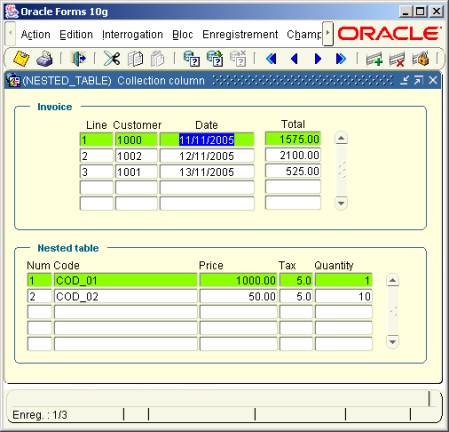
NESTED_TABLE.fmb
This is a MASTER/DETAIL module. The first block (Invoice) is based on the INVOICE table The second block (Nested table) is based on a FROM clause At initialization, the dummy FROM clause is specified as: Select 1,2,3,4,5 from Dual. In the When-New-Record-Instance of the first block, we change dynamically this property: Declare LC$Req Varchar2(256) ;Begin If :INVOICE.INV_NUM Is not null Then -- Dynamic query on nested table block --LC$Req := '(SELECT nt.lig_num, nt.lig_code, nt.lig_pht, nt.lig_tva, nt.ligqty FROM TABLE ( SELECT inv_line FROM INVOICE WHERE inv_num = ' || :INVOICE.INV_NUM || ') nt)' ;
Go_Block('NT' ); Clear_Block ; Set_Block_Property( 'NT', QUERY_DATA_SOURCE_NAME, LC$Req ) ; :System.message_level := 25 ; Execute_Query ; :System.message_level := 0 ; Go_Block('INVOICE') ; Else Go_Block('NT' ); Clear_Block ; Go_Block('INVOICE') ; End if ;End ;
Handling the nested table of the detail block
All we have to do is to overload the standard Forms process for Insert,
Update and Delete line of the collection.
This job is done in the ON-xxx triggers of the detail block.
Trigger ON-INSERT:
-- Insert a line into the collection --
INSERT INTO TABLE
(
SELECT
inv_line
FROM
INVOICE
WHERE
inv_num =
:INVOICE.inv_num
)
Values
(
TYP_LIG_ENV(
:NT.lig_num, :NT.lig_code, :NT.lig_pht, :NT.lig_tva, :NT.ligqty )
);
Trigger ON-UPDATE
-- Update the line in collection --
UPDATE TABLE
(
SELECT
inv_line
FROM
INVOICE
WHERE
inv_num =
:INVOICE.inv_num
) nt
SET
VALUE(nt) =
TYP_LIG_ENV( :NT.lig_num, :NT.lig_code, :NT.lig_pht, :NT.lig_tva, :NT.ligqty )
WHERE
nt.lig_num =
:NT.lig_num
;
Trigger ON-DELETE
-- Delete the line from the collection --
DELETE FROM TABLE
(
SELECT
inv_line
FROM
INVOICE
WHERE
inv_num =
:INVOICE.inv_num
) nt
WHERE
nt.lig_num =
:NT.lig_num
;
Download the samples
You
can download the collection.zip
Unzip the collection.zip file
Create the database objects with the /scripts/install.sql script
Open the NESTED_TABLE.fmb module ( Oracle Forms 10.1.2 )
Compile the module and run.
