Oracle Forms 10g release 2 : Demos, Tips and Techniques
1. Introduction
Here
is a collection of Oracle Forms 10g sample dialogs extracted from a complete
Oracle Forms tutorial.
This
tutorial has been written in French and it would be too time consuming to
translate it all in English.
This
is the reason why I have only extracted and translated these sample dialogs.
The
purpose of this article is not to teach how to build a new form from scratch.
It intends to show some of the main advanced features of the product.
To
clearly understand in details how these dialogs work, you will have to open
them in the Forms Builder and examine them thoroughly.
However,
in this article, I am going to explain the best I can the most important
mechanisms of each sample.
These sample have been tested with an Oracle Forms 10g release 10.1.2.0.2 on an Oracle Database 10g Express Edition Release 10.2.0.1.0.
2. Description of the sample dialogs
2.1
Main screen
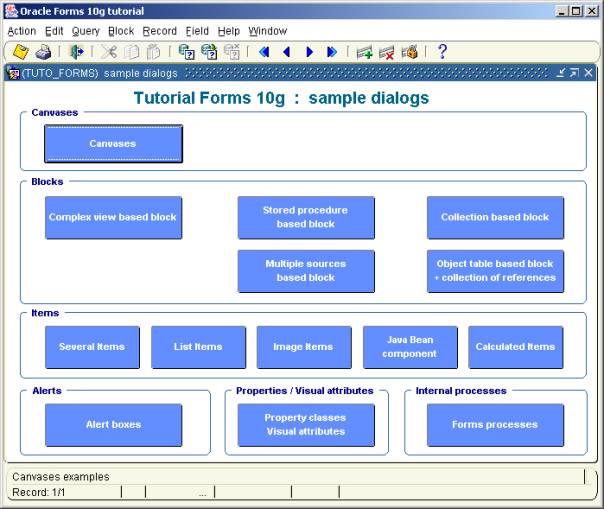
TUTO_FORMS.FMB
This
dialog is the entry point of the samples. Click on a button to start the
corresponding dialog.
2.2
Canvases
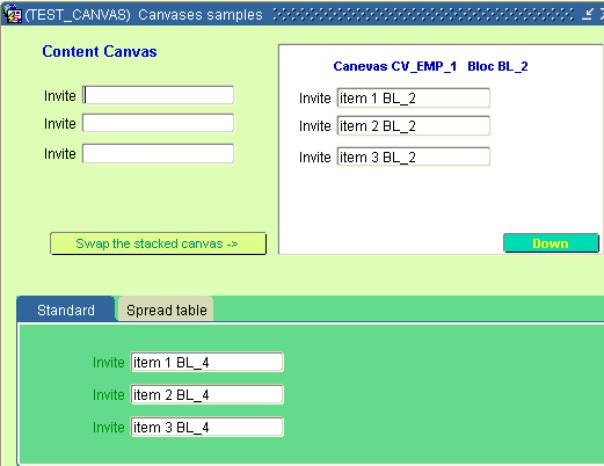
TEST_CANVAS.FMB
This
sample shows three types of canvas :
§
The content canvas (light green)
§
The stacked canvas (white)
§
The tab canvas (dark green)
Stacked
canvas
A stacked canvas is displayed atop—or stacked on—the content canvas assigned to the current window. Stacked canvases obscure some part of the underlying content canvas, and often are shown and hidden programmatically. You can display more than one stacked canvas in a window at the same time
A
stacked canvas allows to scroll a big canvas in a delimited window.
In
this sample, the stacked canvas (CV_EMP_1) is twice bigger than its viewport.
The <Down>
button allows to move the stacked canvas programatically:
Set_View_Property('CV_EMP_1',
VIEWPORT_Y_POS_ON_CANVAS, 140) ;
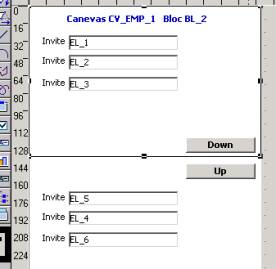
Here
are the properties of this stacked canvas:
Viewport
Viewport X position 77
Viewport Y position 11
Viewport
Width 212
Viewport
Height 138
Physical
Viewport
X position on canvas 0
Viewport
Y position on canvas 0
Width 212
Height 324
The
second Stacked canvas (CV_EMP_3) demonstrates how to integrate in a Tab canvas:

2.3
Blocks
2.3.1
Block based on a complex view
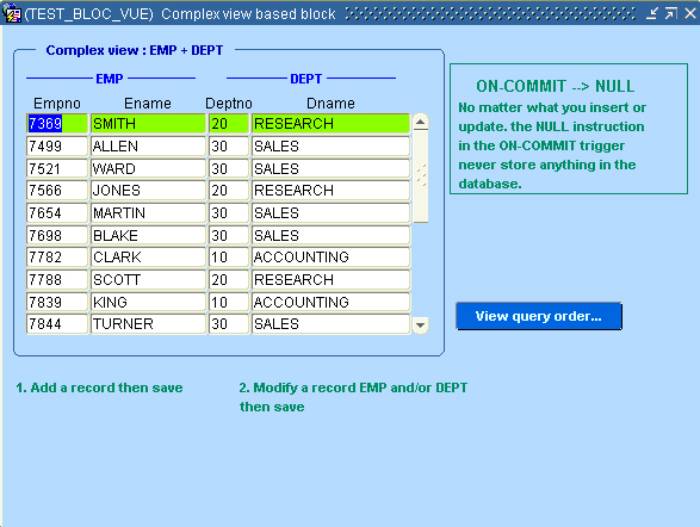
TEST_BLOC_VUE.FMB
This
sample show how you can base a block on a view that aggregate the columns of
several tables (in this case, DEPT and EMP) and when you can insert, update and
delete from the target tables from this view.
The code
that handles the target table is located in a program unit, called from the
three block-level triggers:
§
ON-INSERT
§
ON-UPDATE
§
ON-LOCK
This
is the code of the ins_upd_emp_dept procedure:
PROCEDURE ins_upd_emp_dept IS
LN$Dummy PLS_INTEGER := 0 ;
BEGIN
-- Table DEPT --
Begin
Select 1
Into LN$Dummy
From DUAL
Where exists(
select deptno from dept where deptno = :EMP_DEPT.DEPTNO ) ;
-- Found ->
update --
Message('Update DEPT table');
UPDATE DEPT
SET
DNAME = :EMP_DEPT.DNAME
WHERE
DEPTNO = :EMP_DEPT.DEPTNO ;
Exception
When no_data_found Then
-- Not found -> insert --
Message('Insert into DEPT table');
INSERT INTO DEPT ( DEPTNO, DNAME )
VALUES ( :EMP_DEPT.DEPTNO, :EMP_DEPT.DNAME
) ;
End ;
-- Table EMP --
Begin
Select 1
Into LN$Dummy
From DUAL
Where exists(
select empno from emp where empno = :EMP_DEPT.EMPNO ) ;
-- Found -> update --
Message('Update EMP table');
UPDATE EMP
SET
ENAME = :EMP_DEPT.ENAME
WHERE
EMPNO = :EMP_DEPT.EMPNO ;
Exception
When no_data_found Then
-- Not found -> insert --
Message('Insert into EMP table');
INSERT INTO EMP ( EMPNO, ENAME )
VALUES ( :EMP_DEPT.EMPNO, :EMP_DEPT.ENAME )
;
End ;
END;
2.3.2
Block based on stored procedures
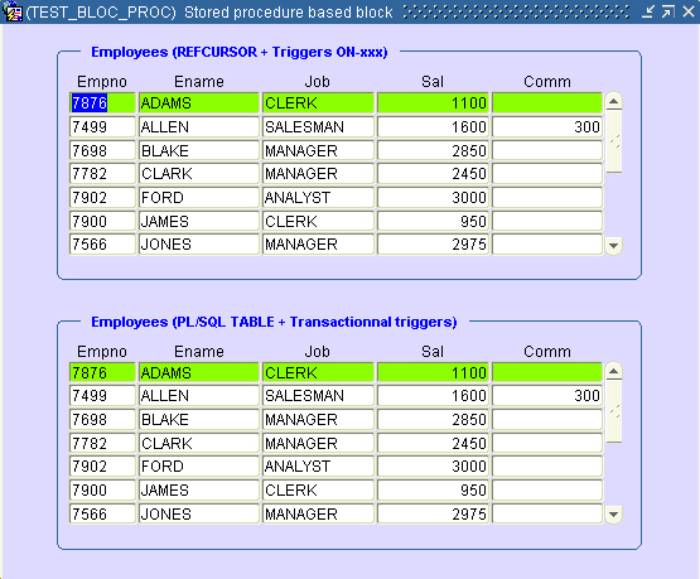
TEST_BLOC_PROC.FMB
This
sample demonstrates how a block can be based on stored procedures.
This
feature can be implemented in two ways:
§
A REF CURSOR
§
A PL/SQL table
In addition
to that, there are also two different locations where to implement this
functionality:
§
The ON-xxx triggers
§
The transactionnal triggers
In
this sample, the top block uses a REF CURSOR with the ON-xxx triggers
The
bottom block uses a collection with the standard transactionnal triggers.
The
stored procedures are located in the PKG_EMP package shipped with
the scripts.
Block1 (EMP), REF CURSOR and ON-xxx triggers
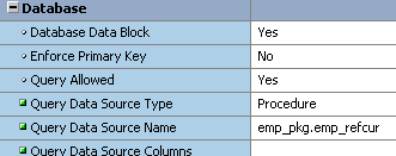
The Query
Data Source Type is set to Procedure and the Query Data Source
Name indicates the name of the query procedure.
The
insert, update, delete and lock orders are managed in the corresponding On-xxx
triggers:
Example
of ON-INSERT trigger:
DECLARE
LR$Emp
emp_pkg.emp_rec;
BEGIN
LR$Emp.empno := :emp.empno;
LR$Emp.ename
:= :emp.ename;
LR$Emp.job := :emp.job;
LR$Emp.sal := :emp.sal;
LR$Emp.comm := :emp.comm;
emp_pkg.emp_insert(
LR$Emp );
END;
The
variable used as parameter is of type of emp_pkg.emp_rec
TYPE emp_rec
IS RECORD(
empno emp.empno%TYPE,
ename emp.ename%TYPE,
job emp.job%TYPE,
sal emp.sal%TYPE,
comm emp.comm%TYPE);
Then
the emp_pkg.emp_insert() stored procedure:
------------
--
Insert --
------------
PROCEDURE
emp_insert(r IN emp_rec) IS
BEGIN
INSERT INTO
emp (empno, ename, job, sal, comm)
VALUES(r.empno,
r.ename, r.job, r.sal, r.comm);
END
emp_insert;
Block2 (EMP_TRG), Collection and transactionnal triggers
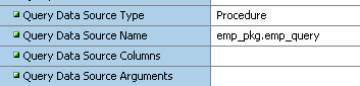
This
block uses a collection of records with the emp.pkg.emp_query procedure.
TYPE emptab
IS TABLE OF emp_rec INDEX BY BINARY_INTEGER;
PROCEDURE
emp_query(emp_data IN OUT emptab) IS
ii NUMBER;
CURSOR
empselect IS
SELECT
empno, ename, job, sal, comm FROM emp
ORDER BY ename ;
BEGIN
OPEN empselect;
ii := 1;
LOOP
FETCH empselect INTO
emp_data( ii ).empno,
emp_data( ii ).ename,
emp_data( ii ).job,
emp_data( ii ).sal,
emp_data( ii ).comm;
EXIT WHEN
empselect%NOTFOUND;
ii := ii
+ 1;
END LOOP;
END
emp_query;
The
collection of records is an IN OUT parameter, read from the database and
returned to Forms.
The
insert, update,delete and lock orders are also managed by stored procedures.
(see
them in detail in the EMP_PKG package)
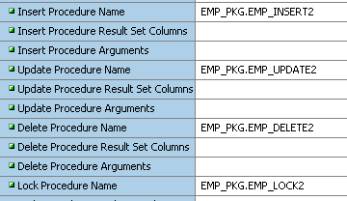
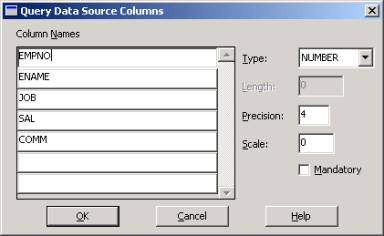
Have
also a look at the Query Data Source Column property that manages the
relation between the columns of the collection and the items of the block.
2.3.3
Block based on a relational table that contains a collection
TEST_COLLECTION.FMB
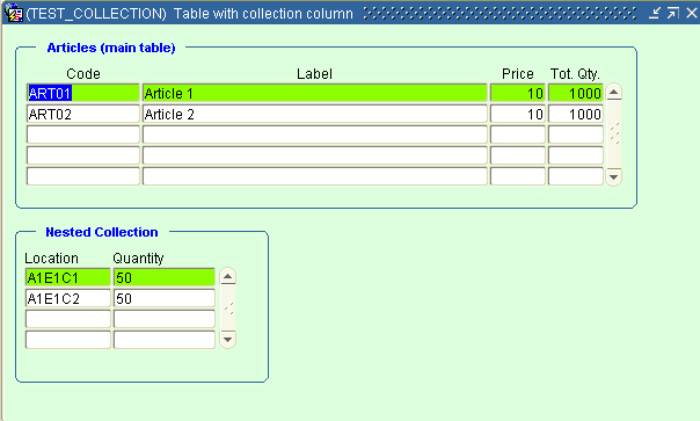
In this
dialog, we can see how to handle a table that contains a nested table
(collection).
There
is no standard buit-in to base a block on a collection, but we will see how
easy it is to work with this sort of object via the ON-xxx triggers.
Here
is the description of the table (ARTICLES)
CREATE TABLE
ARTICLES
( CODE
VARCHAR2(20 BYTE),
LIBELLE VARCHAR2(100 BYTE),
PRIX NUMBER(8,2),
QTETOT NUMBER(8,0),
CASES TAB_TYP_CASE
)
NESTED TABLE
CASES STORE AS CASES_NT
RETURN AS
VALUE;
TAB_TYP_CASE is a table of objects of type : TYP_CASE
create or replace TYPE TYP_CASE AS OBJECT
(
EMP VARCHAR2(10),
QTE NUMBER
)
In this sample, the first block (ARTICLES) displays the standard columns of the ARTICLE table and the second block (detail) displays the columns of its nested table.
Populate
the detail block (nested table)
The
detail block (CASES) is dynamically populated each time a master record change
in a When-New-Record-Instance of the master block:
Declare
LC$Req Varchar2(256) ;
Begin
If
:ARTICLES.CODE Is not null Then
-- Dynamic query of
secondary block --
LC$Req := '(SELECT cases.EMP, cases.QTE FROM
TABLE ( SELECT cases FROM articles WHERE code = ''' || :ARTICLES.CODE || ''')
cases)' ;
Go_Block('CASES' );
Clear_Block ;
Set_Block_Property( 'CASES',
QUERY_DATA_SOURCE_NAME, LC$Req ) ;
-- populate the
block --
Execute_Query ;
Go_Block('ARTICLES') ;
Else
Go_Block('CASES' );
Clear_Block ;
Go_Block('ARTICLES') ;
End if ;
End ;
Because
it is not possible to create a new article with a NULL collection, we have to
handle the insertion into the ARTICLE table in a ON-INSERT trigger:
--------------------------------------------------------------
--
we are doing an explicit insert because the new record --
--
cannot contain a NULL collection --
--------------------------------------------------------------
INSERT INTO ARTICLES
(
CODE,
LIBELLE,
PRIX,
QTETOT,
CASES
)
VALUES
(
:ARTICLES.CODE,
:ARTICLES.LIBELLE,
:ARTICLES.PRIX,
:ARTICLES.QTETOT,
TAB_TYP_CASE() -- insert an empty
collection
)
;
Indeed, if we insert a NULL collection, it will be no longer possible to insert anything in the nested table.
Then after, it is easy to manage the detail records with the ON-xxx triggers of the CASES block:
ON-INSERT:
-- Insert the row in the collection --
INSERT
INTO TABLE
(
SELECT
cases
FROM
articles
WHERE
code = :ARTICLES.CODE
)
Values
(
TYP_CASE( :CASES.EMP, :CASES.QTE )
);
ON-DELETE:
-- Delete row in the collection --
DELETE
FROM TABLE
(
SELECT
cases
FROM
articles
WHERE
code = :ARTICLES.CODE
) cases
WHERE
cases.emp = :CASES.EMP
;
etc.
2.3.4 Block
based on multiple data sources
TEST_DATA_SOURCES.FMB
I
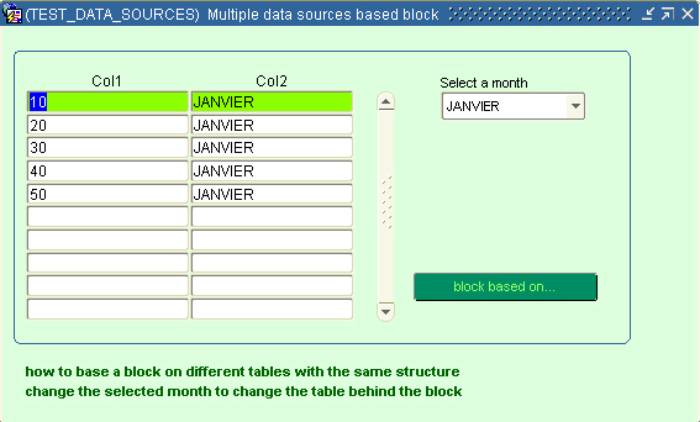
this sample dialog, we can see how to base a block on several tables that share
an identical structure.
(see
the JANVIER, FEVRIER and MARS tables created by the install.sql script)
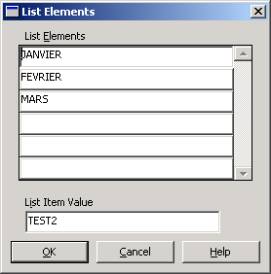
The
list item is populated with the name of three tables that share the same
structure:
Then,
the source table of the block is changed dynamically in the When-List-Changed
trigger:
If :CTRL.CHOIX is not null Then
:global.choix := :ctrl.choix ;
clear_form ;
:ctrl.choix
:= :global.choix ;
-- change the Query Data Source --
Set_Block_Property('TEST2',
QUERY_DATA_SOURCE_NAME, :global.CHOIX );
go_block('TEST2');
execute_query;
End if ;
2.3.5
Block based on an object table that contains a collection of references
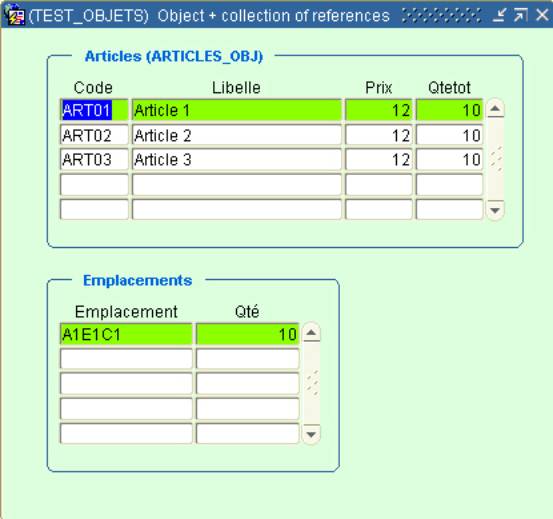
TEST_OBJETS.FMB
Let’s
see how to manage an object table that contains a collection of references.
This
sample is based on the object table (ARTICLE_OBJ) that contains a collection of
references:
create or replace TYPE REF_TYP_EMP AS OBJECT
(
ref_emp REF
TYP_EMP
)
create or replace TYPE TAB_REF_TYP_EMP AS TABLE OF
REF_TYP_EMP
create or replace TYPE TYP_ARTICLES AS OBJECT
(
CODE VARCHAR2 (20),
LIBELLE VARCHAR2 (100),
PRIX NUMBER (8,2),
QTETOT NUMBER (8),
REMP TAB_REF_TYP_EMP -- collection
)
CREATE TABLE
ARTICLES_OBJ OF TYP_ARTICLES
NESTED TABLE
REMP STORE AS REMP_NT
RETURN AS
VALUE;
The
tip is the same that the one used to manage the relational table with nested
table:
- A
when-New-Record-Instance trigger on the
master block to populate the detail block (the collection of references):
Declare
LC$Req Varchar2(256) ;
Begin
If
:ARTICLES.CODE Is not null Then
-- Dynamic query of secondary block --
LC$Req := '(SELECT emp.ref_emp.emp EMP, emp.ref_emp.qte QTE
FROM TABLE( SELECT REMP FROM articles_obj WHERE CODE = ''' || :ARTICLES.CODE || ''') emp
WHERE emp.ref_emp.art = ''' || :ARTICLES.CODE || ''')' ;
Go_Block('CASES'
);
Clear_Block
;
-- change the Query Data Source Name --
Set_Block_Property(
'CASES', QUERY_DATA_SOURCE_NAME, LC$Req ) ;
-- populate the block --
Execute_Query ;
Go_Block('ARTICLES')
;
Else
Go_Block('CASES'
);
Clear_Block
;
Go_Block('ARTICLES')
;
End if ;
End ;
- An
ON-INSERT trigger to insert a new record with an empty collection:
-------------------------------------------------------
--
We are doing an implicit insert because the new --
--
record cannot contain a NULL collection --
-------------------------------------------------------
INSERT INTO ARTICLES_OBJ
VALUES
(
TYP_ARTICLES
(
:ARTICLES.CODE,
:ARTICLES.LIBELLE,
:ARTICLES.PRIX,
:ARTICLES.QTETOT,
TAB_REF_TYP_EMP()
)
) ;
The
collection of references is managed with the corresponding ON-xxx trigger of
the detail block:
ON-INSERT:
-- Insert a row (REF) in the collection --
Declare
LC$Req
Varchar2(256) ;
Begin
LC$Req :=
'INSERT INTO TABLE
( SELECT
remp FROM ARTICLES_OBJ WHERE code = ''' || :ARTICLES.CODE || ''')
VALUES
(
REF_TYP_EMP ( (SELECT REF(a) FROM EMP_OBJ a WHERE a.ART = '''
||
:ARTICLES.CODE || ''' AND a.EMP = ''' || :CASES.EMP || ''') ) )' ;
Forms_Ddl(
LC$Req ) ;
End ;
ON-DELETE:
-- Delete the row (REF) of the collection
--
DELETE FROM TABLE
( SELECT remp
FROM ARTICLES_OBJ WHERE code = :ARTICLES.CODE ) emp
WHERE
emp.ref_emp.art = :ARTICLES.CODE
And
emp.ref_emp.emp = :CASES.EMP
;
2.4
Items
2.4.1
Principal items
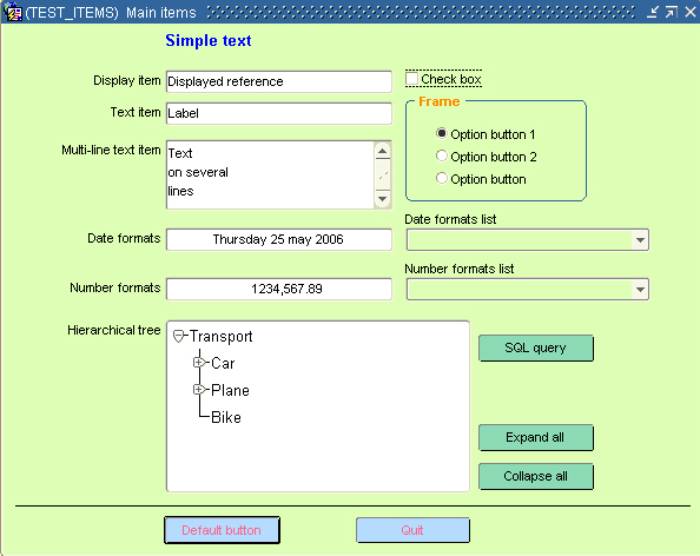
TEST_ITEMS.FMB
Here
is a description of the main items.
Click
everywhere on each item to see some information messages and some particular
behaviours.
2.4.2
List items
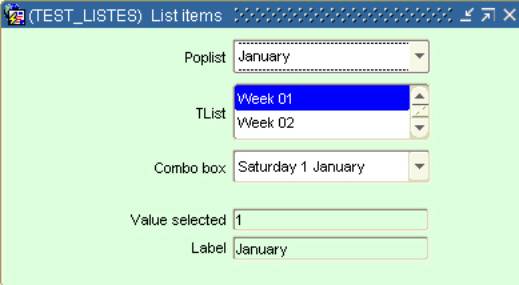
TEST_LISTES.FMB
Let’s
study and handle the three sorts of list item and also the different ways to
populate them.
In
this sample, the three list items are synchronized. Change the value of the first
list and it will adapt the content of the second then the content of the third.
For
each new list value, the corresponding value and label are displayed.
a)
The first list item is populated with the RG_MOIS record group:
-- List 1 --
errcode := Populate_Group( 'RG_MOIS' );
CLEAR_LIST('BLOC2.LISTE1');
POPULATE_LIST('BLOC2.LISTE1',
'RG_MOIS' );
-- Select
the first value --
:BLOC2.LISTE1
:= Get_List_Element_Value('BLOC2.LISTE1', 1 ) ;
b)
Then init the second list item
-- Update the weeks list --
errcode
:= Populate_Group( 'RG_SEMAINES' );
CLEAR_LIST('BLOC2.LISTE2');
POPULATE_LIST('BLOC2.LISTE2',
'RG_SEMAINES' );
-- Select
the first value --
:BLOC2.LISTE2
:= Get_List_Element_Value('BLOC2.LISTE2', 1 ) ;
c)
That finally init the third list item:
PROCEDURE Init_Liste3 IS
LC$D Varchar2(12) ;
LC$Day
Varchar2(20) ;
BEGIN
-- Update the days list --
LC$D :=
'01/01/2005' ;
Clear_List(
'BLOC2.LISTE3' );
For i IN
0..6 Loop
SELECT
to_char(
To_date(LC$D, 'DD/MM/YYYY' ) + (i + ((To_number(:BLOC2.LISTE2)-1) * 7)), 'FMDay
DD Month' )
Into
LC$Day
FROM dual
;
Add_List_Element('BLOC2.LISTE3',
i + 1, LC$Day, LC$Day ) ;
End loop ;
-- Select the first value --
:BLOC2.LISTE3 := Get_List_Element_Value('BLOC2.LISTE3', 1 ) ;
Exception
When Others
then
Null
;
END;
2.4.3
Image items
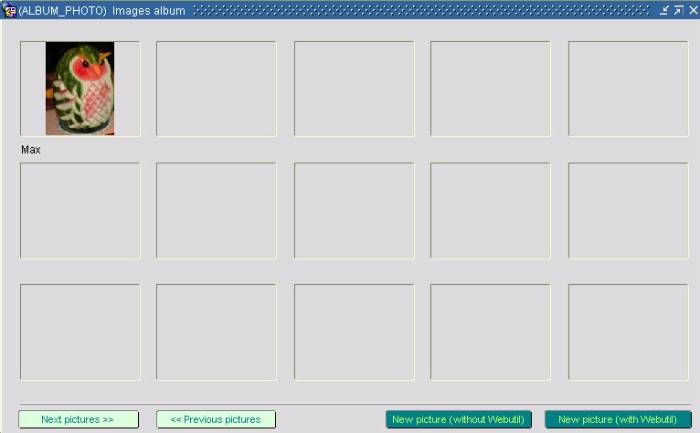
ALBUM_PHOTO.FMB
This
dialog is the main part of the ensemble that allows to search, attach and
display images.
You
can build a photo album based on a one image’s column table.
CREATE TABLE
PHOTOS
( LEGENDE
VARCHAR2(100 BYTE),
PHOTO BLOB NOT NULL ENABLE,
FORMAT VARCHAR2(50 BYTE) NOT NULL ENABLE,
CREDIT VARCHAR2(50 BYTE) NOT NULL ENABLE,
LIEN VARCHAR2(100 BYTE),
IDENTIFIANT NUMBER(5,0) NOT NULL ENABLE,
NOM VARCHAR2(50 BYTE),
CONSTRAINT PHOTO_PK PRIMARY KEY (IDENTIFIANT) ENABLE
) ;
It
shows two ways to search a filename on the local machine with and without
Webutil.
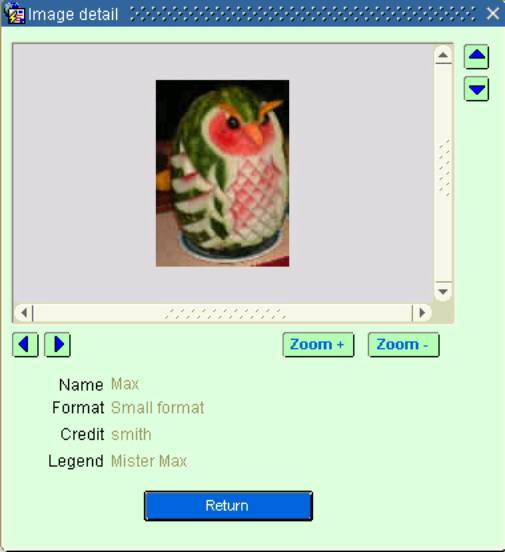
By
clicking on a picture, you can navigate on another canvas to display the detail
of the picture:
CHARGE_PHOTO.FMB
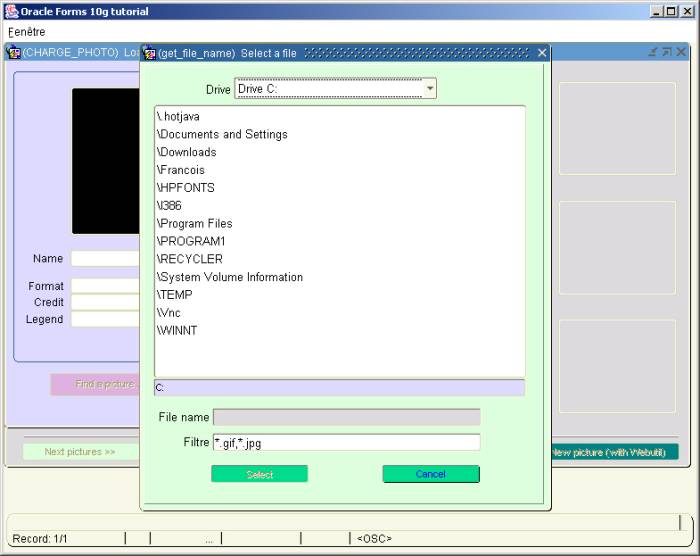
The get_file_name
sample dialog is only a “pure exercice of style” , because it is so easy to
pick-up a file with the File_Open_Dialog() Webutil function.
This
sample is interesting to see how to use the HOST() and TEXT_IO()
functions to get the list of the local machine drives and their content.
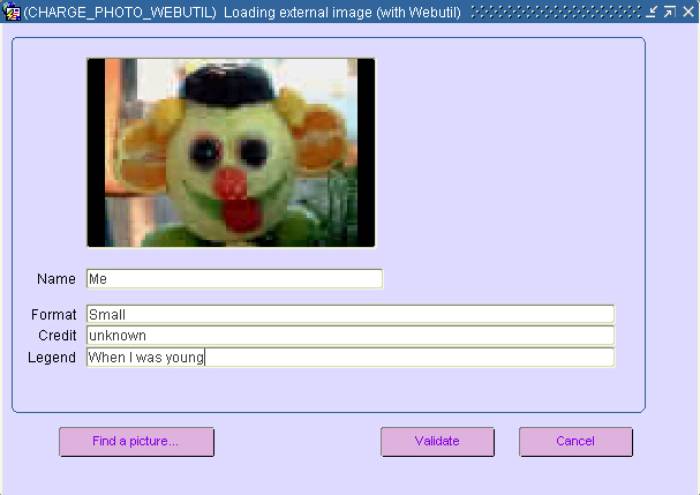
CHARGE_PHOTO_WEBUTIL.FMB
Another
dialog to store the picture and its properties.
2.4.4
Java Bean component
TEST_GRAPH.FMB
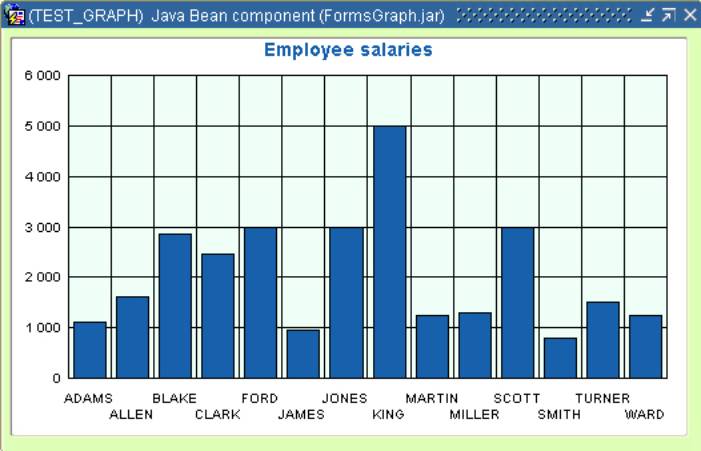
Here
is a sample to demonstrate how to handle a bean area.
This
dialog use the Oracle FormsGraph Java Bean that is part of the Oracle Forms
demos.
You
can download the FormsGraph.jar file on the OTN page
http://www.oracle.com/technology/sample_code/products/forms/files/formsgraph_patch2005.zip
2.4.5
Calculated items
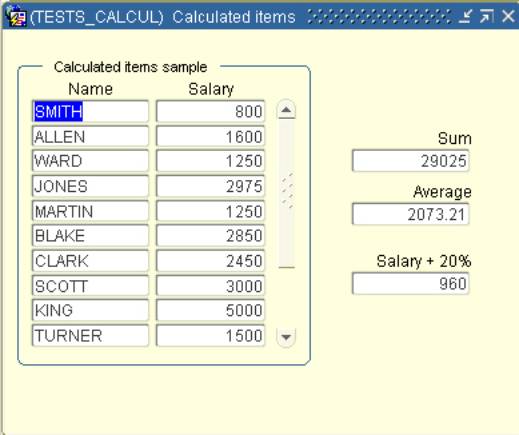
TESTS_CALCUL.FMB
Let’s
see how to use the calculated items.
The
first calculated item use the Summary calculation mode:
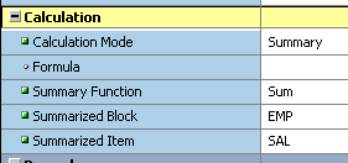
The
third one use a Formula calculation mode
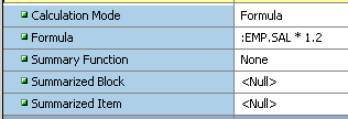
2.5
Alerts
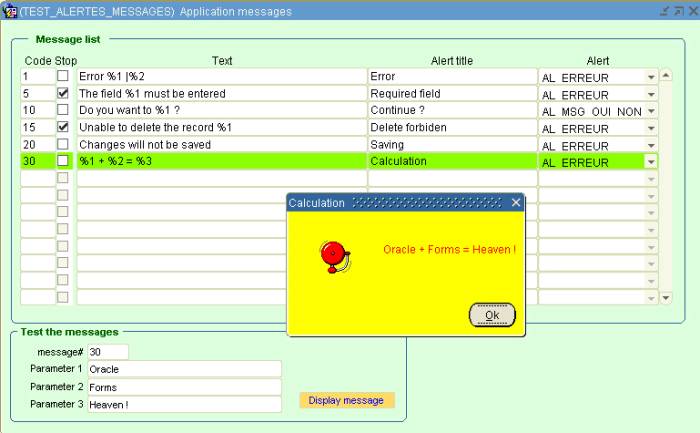
TEST_ALERTES_MESSAGES.FMB
This
dialog shows how to use the Alert boxes to build the messaging engine of your
Forms application.
The
message texts are read from the database then displayed via Alert boxes.
To
reduce the number of messages needed in the application, some of them can take from 1 up to 3 parmeters (%1,
%2 and %3). A pipe (|) character allows to split the message on several lines.
The
main block is based on the MESSAGES table.
CREATE TABLE
MESSAGES
( CODE
NUMBER(5,0) NOT NULL ENABLE,
-- unique identifiant
TEXTE VARCHAR2(256) NOT NULL ENABLE, -- text of
the message
TITRE VARCHAR2(100), -- title of the
alert
STOP VARCHAR2(1) DEFAULT 'N' NOT NULL ENABLE, -- Shall we stop the process ? (raise form_trigger_failure)
ALERTE VARCHAR2(15), -- name of the
alert box
CONSTRAINT MSG_PK PRIMARY KEY (CODE) ENABLE
)
This
sample use the Affiche_Message() procedure of the TUTO_FORMS pl/sql
library to display the messages.
These
messages can be displayed through the 3 alert boxes available in every dialog
of this demo.
§
AL_ERREUR wich is the simple “OK” alert box.
§
AL_MSG_OUI_NON wich is a yes/no alert box
(default yes)
§
AL_MSG_NON_OUI wich is a yes/no alert box
(default no)
2.6
Property classes and visual attributes
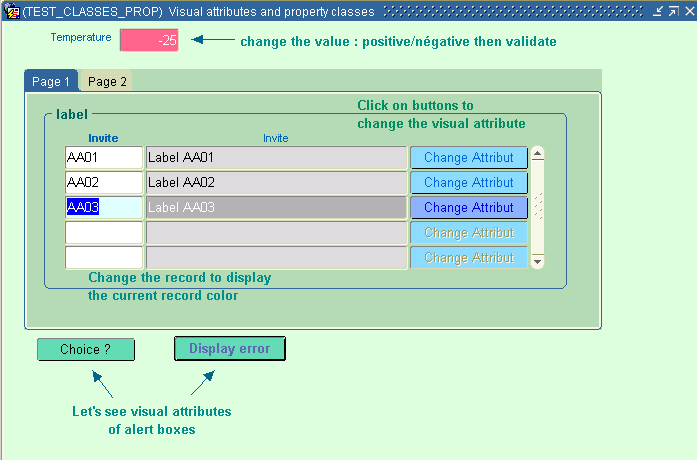
TEST_CLASSES_PROP.FMB
Let’s
see some ways to use the property classes and the visual attributes to colorize
and highlight dynamically different objects of the form (alert, item, current
record, etc.).
Property
classes and visual attributes are located in the OBJ_TUTO_FORMS.olb
object library.
2.7
Forms internal triggering events
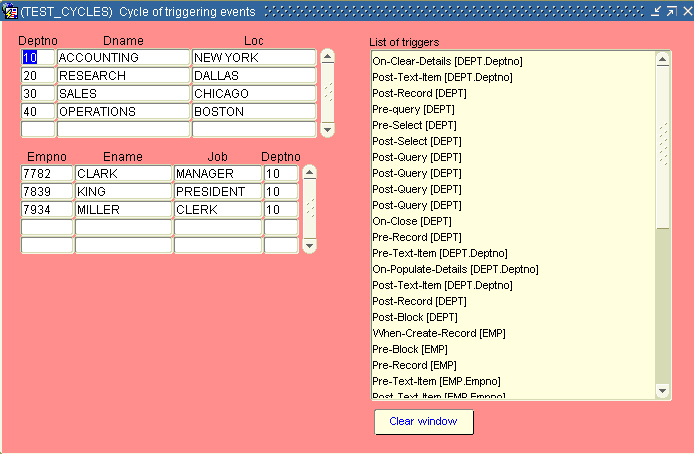
TEST_CYCLES.FMB
This
dialog allows you to understand what trigger fire and in what order when you
use the application.
Before
each particular action, you can clear the list of triggers window.
This
window show you what trigger is firing in what order and from what block and
what item.
3. Installation steps
This
sample dialog need database objects to run.
All
the necessary objects are provided in the tutoforms10g.zip file shipped with
the article.
This
zip file contains 2 sub directories:
/config that contains the configuration files.
/scripts that contains the Sql script files to create the database objects.
§
Download
the tutoforms10g.zip file
§
Unzip the tutoforms10g.zip file under your <DEVSUITE_HOME>/forms/
directory.
§
Create a new user in your database
§
With Sql*plus or SqlDeveloper, run the /scripts/install.sql
script
note : because this demo use the Webutil functions, the
Oracle user where you have created these objects must have the WEBUTIL_DB package compiled
or a grant EXECUTE to this package if it is present in another schema.
§
Under the /tutoforms/ directory compile
all the source modules
You can use the compile_all.bat file located in the same directory to
compile all objects at once.
e.g. compile_all
user/password@instance
§
Edit the /tutoforms/config/tutforms10g.env
file to indicate your own settings (in blue in this example)
#oracle
home adapt this value to your own
setting
ORACLE_HOME=D:\Dev10gR2
FORMS_PATH=%ORACLE_HOME%\forms\tutoforms
ORACLE_PATH=%ORACLE_HOME%\forms\tutoforms
FORMS_TRACE_PATH=%ORACLE_HOME%\forms\tutoforms
CLASSPATH=D:\Dev10gR2\forms\java\frmwebutil.jar;%ORACLE_HOME%\jlib\debugger.jar;%ORACLE_HOME%\forms\tutoforms\FormsGraph.jar;%ORACLE_HOME%\forms\tutoforms\myIcons.jar;
#
webutil config file path
WEBUTIL_CONFIG=D:\Dev10gR2\forms\server\webutil.cfg
§
Edit the /tutoforms/config/
add_to_formsweb.cfg file to set your own database connect string (in blue
in this example)
...
lookAndFeel=Oracle
colorScheme=blaf
logo=no
#don't
forget to put your own database connexion
userid=tutoforms10g/tutoforms10g@XE
§
Copy the /tutoforms/config/tutforms10g.env
to the /forms/server directory
§
add the /tutoforms/config/
add_to_formsweb.cfg at the end of your /forms/server/formsweb.cfg
file
§
Then, you can start the demo by indicating the
new [tutoforms10g] formsweb.cfg section.
http://machine:8890/forms/frmservlet?config=tutoforms10g