Version 1.3.4.2
Needs, at least, the Sun Java plugin
1.4
- Code source and documentation
- What’s new in the current version?
- Manage
your CSS file with the css_updater sample dialog
- Implement
the L&F in your every Forms module with the JDAPI_LAF tool
- See
a video on how to create a brand new dialog with the L&F feature
- Bugs
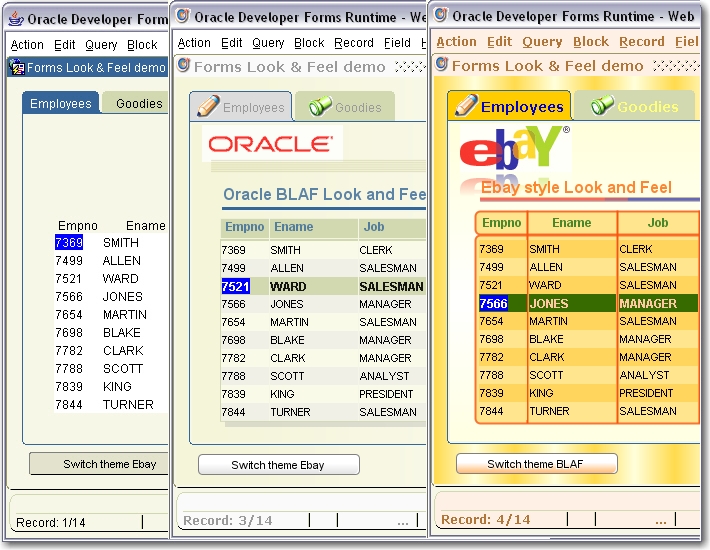
Presentation
The Look
and Feel project is a set of tools that allows decorating a Forms module.
All the decoration information is read
from an external CSS file.

The tool is made up of a PL/SQL library (laf.pll) and a set of Java Beans and PJCs
grouped in a jar file (laf.jar).
Because the graphical information is read
from a given CSS file, it is easy to change the look and feel of the
application without modifying the form modules.
With it, you can really externalize the
look of the Forms application by separating the functional implementation to
the graphical presentation.

Code source and
Documentation
A complete documentation is provided to
describe the syntax of each method and property.
Get the LAF sources here:
|
|
|||
|
|
|||
|
|
|||
|
LAF_1342.zip (current version) |
|
Get the complete Look and Feel project
documentation here:
LAF_XP_PopList PJCs properties
LAF_XP_RadioButton PJCs
properties
You want to
participate?
The participation to this project is open,
so you would be allowed to participate by providing:
If you want to participate, send an email
with your idea, suggestion, code snippets to the forms-pjc-bean
mailbox (forms.pjc.bean@free.fr)
and write "Look and Feel project" in the subject.
Your name will be included on the
participants' list.
What's new in
the current version?
Version 1.3.4.2 corrects a few bugs on the TextField
and TextArea beans, and offers a few new methods.
The
ADD_IMAGE method has been modified
to accept a last argument that can turn the image in a sensitive area.
When
the user clicks this image, a message is sent to the Bean Area through its When-Custom-Item-Event trigger, allowing
the developer to start an action..
This
method has also been modified to accept the special -1 value in place of the width
or height argument in the purpose ok keeping the aspect ratio of the scaled
image.
See
the new ADD_IMAGE syntax in the DrawLAF bean
documentation:
A
new SET_ALL_HYPER_LINK_COLORS has
been added to the DrawLAF bean to set the colors of every hyper link item in a single shot.
Version 1.3.4.1 introduces the Socket Server feature, allowing the Forms
module to receive messages from the outside.

On
the screenshot, you can see coming asynchronous messages sent by a database
trigger.
All
you have to do is to open a socket on a given port, and then the Forms module
is ready to listen to this port. It is, then, easy to send asynchronous
messages from any place.
See
the following example that sends a message from the database:
1.
Open the port 4450 from the Forms module:
Set_Custom_Property( 'BL.BEAN', 1, 'INIT_SERVER', '4450' ) ;
2.
Send a message from the database through this port:
CREATE OR REPLACE TRIGGER TRG_BI_TRACE
BEFORE INSERT
ON TRACE
REFERENCING NEW AS NEW OLD
AS OLD
FOR EACH ROW
DECLARE
c utl_tcp.connection;
-- TCP/IP connection to the Socket server
ret_val
PLS_INTEGER;
BEGIN
c
:= utl_tcp.open_connection(remote_host
=> '10.75.19.44',
remote_port => 4450);
ret_val := utl_tcp.write_line(c,
'Inserted line in table TRACE: ' || :NEW.LIGNE);
utl_tcp.close_connection(c);
EXCEPTION
WHEN
OTHERS THEN
-- Consider logging the error and then
re-raise
RAISE;
END TRG_BI_TRACE;
/
In
this sample code, a database trigger is used to send a message each time a row
is inserted in the TRACE table (LIGNE is a Varchar2 column of this table).
This
way, you do not need any more Forms timer to query the database in an active
way, but you can simply be in a passive way, receiving messages from the
database (or any external source able to send a message through a socket).
Test
it with the laf_socketserver.fmb
provided in the /fmb
directory of the LAF_1341.zip archive.
Version 1.3.4 does not revolutionize the project, but add a few
enhancements.

You
can, at runtime add, enable, disable, show, hide and remove menus and menu
options of any depth.
The
corresponding ADD_MENU and ADD_MENU_OPTION methods have been modified to accept
the pointed notation.
Set_Custom_Property('BL.BEAN', 1,
'ADD_MENU', 'Menu1.SubMenu1,SubMenu1'
) ;
Set_Custom_Property('BL.BEAN', 1,
'ADD_MENU_OPTION', 'Menu1.SubMenu1.SubSubMenu1.Exit,Exit,Exit-Form'
) ;
The
ADD_MENU method needs, now, two arguments:
·
Dynamic Frames have also
been enhanced to display a better frame-title result.
·
Two methods have been added
to get a color from a Java JColorChooser:
o
GET_COLORCHOOSER_COLOR to get the color from a JColorChooser
The
value is returned as a RxGxBx
string.
o
SET_COLORCHOOSER_VALUES to set the JColorChooser initial color
(required) and title (optional).
Color must be in RxGxB
string format.
Declare
LC$Color Varchar2(12);
Begin
-- set color
and title to initialize the JColorChooser with --
Set_Custom_Property('CTRL.LAF', 1, ' SET_COLORCHOOSER_VALUES',
'r200g100b0,Choose a color');
-- get a color
chosen from a JColorChooser --
LC$Color :=
Get_Custom_Property('CTRL.LAF', 1, 'GET_COLORCHOOSER_COLOR');
End;
·
A third argument has
been added to the SET_GRADIENT_COLORS
method.
It
allows playing with the transparency level of the gradient painted on the
canvas background.
The
value must be between 0 and 1.
0 corresponds to a full
transparent factor (invisible).
1 corresponds to a full
opaque gradient.
If
this factor, not required, is not provided, the default value is : .2
-- intensive gradient --
Set_Custom_Property( 'CTRL.LAF' 'SET_GRADIENT_COLORS', 'r0g0b0,r255g255b255,.8' );
The
corresponding tag in the .CSS file is: gradient-colors of any section of canvas type:
.maincanvasOracle {
type:canvas
gradient-colors:r51g102b153,r210g216b176,.1
...
}
·
Some people don’t
like to see the tiny lines drawn around an item when it has the focus.
A
DRAW_FOCUS_LINES method has been added
to the DrawLAF.java bean to decide if you want or not
draw the item focus lines.
-- do not draw the focus lines on items --
Set_Custom_Property( 'CTRL.LAF' ' DRAW_FOCUS_LINES ', 'false' );
Version 1.3.3.1 adds the StatusBar
features, and also corrects a bug with the laf.pll
library for table-blocks where all items are not located on the same canvas
(Correction provided by John Vander Heyden).
![]()
As you can see on the figure below, the
Status bar is divided in 2 lines.
The first line has 2 zones call 1,1 and 1,2
The second lines has 6 zones called 2,1 to 2,6
You can get and set the text of one of
these zones with the new:
Set_Custom_Property('bl.bean', 1, 'SET_STATUSBAR_VALUE', 'status_line,status_index,the value' ) ;
For instance, to set the value of the
first line, first zone (which is typically the message zone) use the method as
follows:
Set_Custom_Property('bl.bean',
1, 'SET_STATUSBAR_VALUE', '1,1,Hello' ) ;
You can get the content of any zone with:
Set_Custom_Property('bl.bean',
1, 'SET_STATUSBAR_INDEX', '1,1' ) ;
V_value := Get_Custom_Property('bl.bean', 1, 'GET_STATUSBAR_VALUE') ;
A REFRESH()
method has also been added to the DrawLAF.java bean
to allows re-painting the windows after the use of the ADD_IMAGE() method.
When this method is used in a
When-New-Firm-Instance trigger, the screen does not have to be refreshed to see
the images.
When you use this method in a
When-Button-Pressed trigger, the images are not immediately shown. So provide
this method just after the ADD_IMAGE() call:
Set_Custom_Property('bl.bean',
1, 'REFRESH', '' ) ;
Version 1.3.3 adds the dynamic menu feature.
You can add menu options to an existing
popup menu, add a new popup with its menu options.

The entire current menu is scanned so this
is the reason why you can handle
existing popup/options, even those provided in the Forms internal standard menu
(DEFAULT,DEFAULT&SMARTBAR).
With the current toolbar, you can add,
remove, show, hide, enable, disabled any popup or menu option
See the DrawLAF bean properties documentation
to get detail of the new methods.
Notice that the naming convention uses the
displayed name of popup menus and menu options, so it can change according to
your own language setting.
A sample dialog (test_dynamic_menus.fmb) is
provided for you to test. You can find it in the /fmb
subdirectory of the zip file.
Version 1.3.2 introduces the forgotten Text Item.
Single and multi-line Text Items are, now,
taken into account and support the following:
In addition, some events can be sent back
to Forms through the Tom
Cleymans DispatchingBean
solution.
You can, now set any Regular Expression
pattern to perform complex item validation.
You can get and set the current cursor
location and the character selection.
You can blink single-lineText
Items.
You can manage Hyperlinks by launching
URLs by clicking on them.

The text_items.fmb sample module
is part of the zip file (/fmb)
for you to test.
For a complete documentation on methods
you can set/get, see the LAF_XP_TextField documentation and LAF_XP_TextArea documentation.
Version 1.3.1 is a consolidation of the 1.3 new features.
a. The properties set to menus, window caption
bars, status bar, input dialog boxes, dynamic frames and tabs can be
initialized, now, from the CSS file.
In one hand, they can inherit some of
their properties directly from the current selected color
scheme.
In the other hand you can set the global
properties for those elements. Global properties are those that are not
specifically set at run time.
New tags have been added to the GUI
section of the CSS file to store this information:
.GUIPropertiesOracle {
type:gui
scheme:silver
enhanced-lists:true
tlist-multi-selection:true
tlist-sorted:false
tlist-orientation:vertical
poplist-settimekeyselect:8000
/*
/* menu, window
caption and status bar */
/*
light-color-scheme:true
menu-use-scheme:true
window-use-scheme:true
status-use-scheme:true
/*
/* tab properties */
/*
tab-use-scheme:false
tab-selected-colors:r255g255b255,r51g102b153
tab-colors:r0g0b204,r255g255b120
/*
/* dialog properties
*/
/*
dialog-use-scheme:true
dialog-font:Verdana,14
/*
/* frames
properties */
/*
frame-use-scheme:true
frame-font:Verdana,B,12